
New Pattern Recognition Select Similar Option
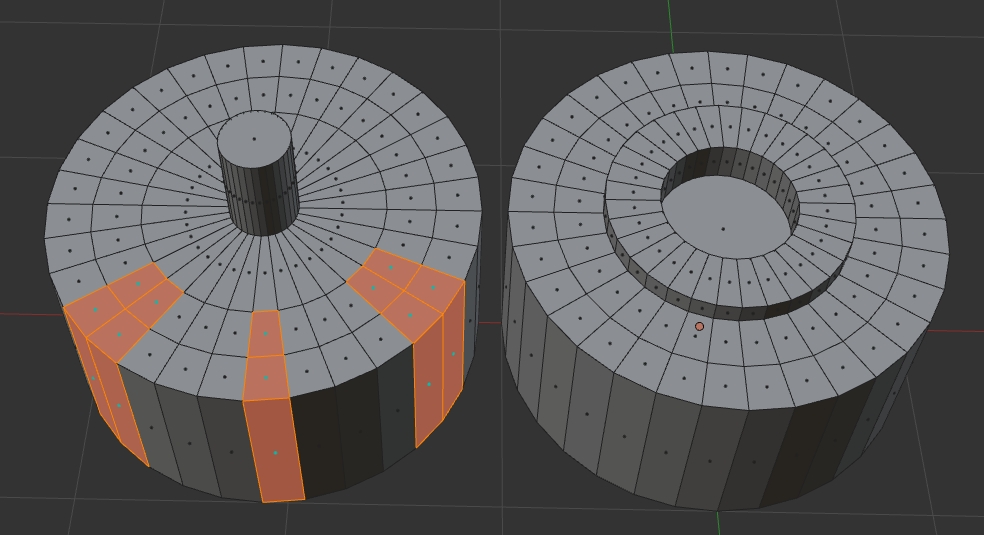
I've always tried to use this function but it fails me a lot especially when I need to select repeating patterns whether it's on the same connected faces or when I have duplicate elements inside the same object. As you see in the left image selecting all those edges its quite tedious and none of the options would help at all. In the image on the right, I got copies of the same element and I can't either select the same faces across all copies when those elements have identical common faces or they are 100% the same.

This is a more complex selection using the same option I propose:
Both objects share the base intact so the area should be the same up to where it's selected. This is a more complex situation where if that could be achieved the same tool could serve for absolutely any kind of selections where the objects share the exact same topology in certain parts while other could be different. Not entirely sure of limitations if the meshes need to be 100% the same. But I guess the tool could have some extra options for its algorithm in order to refine the selections in case of very complex meshes.
17 Comments
I have just added a new situation to the post above.
Another way :)
@forestgumpovu4: This is a total different approach. You marked those before making copies. The problem is when you forgot to do that in the first place.
@luisburdallo: " If you forgot " .... Gooooodddddd.... If you do some work but you forgot - it is your problem. If you do 735 copies of same window for skyscraper but you forgot to press
Alt + Dand you do not create 735 instances but just create 735 objects - it's your problem to forgot something....I vote up this. But you do not propose anything. You describe that you find this system not ideal, you can't do what you want at one click, then you describe when you want something to do but you can't and that's all. All proposal is " Better Select Similar Options ".
Its like I look at the sky and say " I want better car ". And then I sit and wait for miracle.
@forestgumpovu4: What kind of answer is that? This is about making the designer life easier and there are situations where you decide to do something once the object has been created. Do you think everything is planed and nothing could be changed or tweaked? You seem to totally don't get the point of the proposal. Just show me how to select random selected faces or patterns in several shapes with one click and let me know if my proposal doesn't make sense. There are tons of uses for what I am saying and you still try to be right. You don't have to upvote it if you don't see the point, honestly.
@luisburdallo:
I just say that propose is:
Either - it's just some desires like " I want to have button to click it and all become better ".
Post this GIFs because who know, maybe it help someone. I work with Blender long time and still find something new time by time.
Have nothing against some new ways to select similar, why not.. So vote up.
About what exactly you mean - it was some kind of hard multiple steps calculations to find elements similar to what was in selection, than from matched elements search for few elements together matching, etc., etc...
Look at current stuff. We can search for normals, perimeter, area, length, direction all this info already there for each subelement. But shape of one or multiple elements is a complex collaboration.
And how about precision levels. Even minimum scaling/moving/rotating of one subelement cause false select similar script if there is no precision levels. So it make such mechanic even more complex to code & calculate. If it can be implemented by someone - it would be great!!
@forestgumpovu4: I appreciate your opinion on this. If I had the skills be sure I would do it. I believe my proposal is clear enough and I still think some things cannot be achieved with the current options and that someone ( A coder ) obviously reading this could come up with something by investigating, trial and error. If not... It will not be made. That's all not a big deal. Most things are developed from basic ideas and this is a place for positive discussions and brainstorming.
Challenge accepted :) It seems you don't know all aspects of force young Jedi ... But of course sometimes it's not enough.
@forestgumpovu4: in addition to all of these, you can also select two edges and then "select next" until it loops back around. I have select next/less bound to my mousewheel so all i have to do is spin it. From there you just multi-select loops and you've got them all. I'm definitely not against more selection options- I love having tons of options to work into my pipeline, so you get an upvote for that- but I think you're going to have to be more specific with your proposal
@forestgumpovu4: Gorgeous! Now, don't you think there should be easier ways to do some basic repeated pattern selections? I wasn't aware of F6 for selections. I still think a basic repeated pattern selection option should be available in the menu. Even tho the way you did it might be versatile you can't get uneven selections right. By the way, the second one you are selecting the entire ring and that was not the situation. Did you try selecting just parts of the perimeter and not always the entire flat section? Imagine you want to select uneven random faces in separate sections and just get the same exact faces on identical meshes in that same object.
@eldee.smith: I don't understand how that has anything to do with repeating pattern selection or same selected polygons on other identical meshes.
@luisburdallo: uhh.. because repeat pattern selection is exactly the purpose of select next and select previous. It doesn't really help you with identical meshes, but it's relevant to half of what you're after.
@eldee.smith: Interesting. How did you grow all selected edges afterward? Maybe my left side example wasn't the best example for this proposal (removed already so the original proposal idea doesn't get confused) even thoough the same tool could work for simpler selection as the one you just show there. Instead of all those steps, it can take a single click. The select similar option proposal suppose to work in many different situations or more complex selections.
@luisburdallo: growing the selected edges is done using the mesh.loop_multi_select operator
@eldee.smith: Will check that out. Thanks for the tip. :)
@luisburdallo: You also can check this Addon it has few handy things for loop & ring selections.
@forestgumpovu4: One of those add-ons I had installed and forgotten for a long time. Thanks for reminding me it exists.