
[Viewport camera control option] Right mouse click rotate camera
Hello, currently the way to rotate/manipulate the viewport camera is wih the middle mouse button , honestly its very tedious to use that button since its quite in a unergonomic location on the mouse and it has a much diferrent shape to a normal mouse button.
I would like to propose a function that would give you an option to choose between Middle mouse button viewport camera manipulation or Right mouse button viewport camera manipulation In Object/Edit/Sculpt mode.
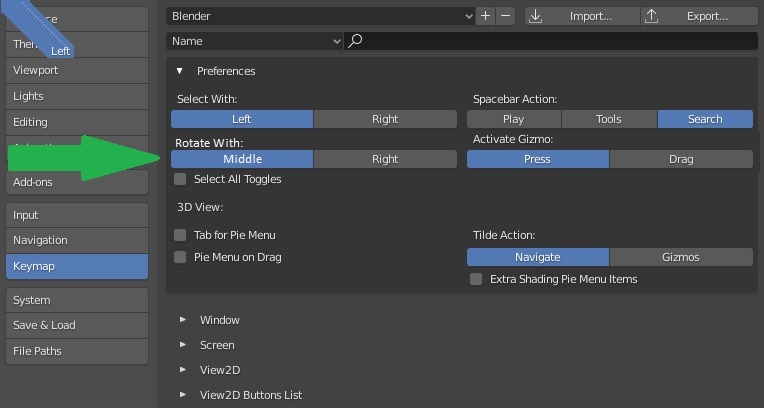
Something like how Left/Right click select is currently implemented in blender, i would like for the Swap MMB/RMB to also be available as a personal customisation but still keep the right click to open the contet menu.
Thank you :)
20 Comments
I finally found how to configure it simply. You have to really dig inside the prefs, but it's very easy when you understand where to change.
I'm in Blender 3.0
Go to menu Edit > Preferences > Keymap > scroll down to the many item lists and unfold "3D View", then it will all happen here.
Only 2 things to do :
On line 1 : "Mouse", "Right Click" On line 2 : "Right", "Click Drag"
Change the option "Press" to "Click".
That's all : a simple right click will still open the context menu, and a right and drag click on the touchpad will rotate the view!
⚡️ PERFECT 🤩 ⚡️ thank you you are saving my life (coming from 10 year on rhinoceros)
This is great! Is it possible to change it so this works in edit mode also?
Under Keymap, search for right mouse in Key-Binding mode, and manually change anything that uses right mouse press to right mouse click. A lot of options to go through but hopefully you don't have to do this too often. The OP's proposal would still be a welcome change.
If you want to do this for edit mode too then:
(I am on 3.6.7)
Navigate to Mesh and then Mesh global
Scroll near to the bottom untill you find Call menu mouse not keyboard, click Call menu mouse and change right mouse button press to right click.
I used my mouse configuration (Logitech Device Manager) to swap the Middle and Right click buttons, but only when in Blender. No keymaps needed.
You can also switch to Bforartists which has these settings by default. Seems like Blender has become too big to care about what people want.
i really wish blender will have this option as well in the future, orbit with middle mouse is really hard compare to right mouse.
Hi,
Are you proposing something different than changing the keymap? That is where the current assignment is stored. Changing the binding to right-click for rotate is already an option option. You will, however, have to solve the conflict with the context menus.
* @rwees * Yes, the way Left/Right mouse click is handled right now. The conflict is a problem, but that's a problem with how keymaping works ?! ; **added picture example
* @Dragosh * I haven't used Maya in a while and I just use muscle memory to navigate. I think in Maya, RMB is used in conjuction with Alt to zoom. Maya also has context menus, but you would need to hold RMB down for like 0.5+ to make it come up. Why not just use Blender 2.7x's shortcut of W instead of RMB for context menus? Then you can use RMB for navigation.
* @etufo2 * That's not a solution for me, context menus are the norm for right click, right click should bring up the context menu and holding right mouse would rotate the viewport
* @Dragosh * Do this: {attachment blender_U6JQB2rfJapng}
* @etufo2 * and this. Change rotate value to Click Drag and context menu to Click {attachment blender_he6GH4DnKJpng}
* @etufo2 * Works, but only issue is that i have to change the pan as well, with every blender update i have to change the settings every time (be it import settings or fresh), would be great if we had an option that works like left/right mouse click button, also zoom does not work while orbit is being held down
* @Dragosh * I have discovered that i have to do the same in the sculpt mode and have no idea where the setting for that one is
* @Dragosh * you talking about the context menu or rotation?{attachment blender_174KNqEC8Opng}
* @etufo2 * Rotation
Another problem i've found is that a lot of other tools rely on the right click to cancel the operation, which makes rotating the camera while editing object nearly impossible
* @Dragosh * Seeing as this proposal isn't gaining any traction, you'll have to just make a custom shortcut set and tweak as you find conflicts. Or just get used to Blender's default behaviour.