
Advanced bevel tool
The bevel tool is one of the most called tools in my workflow.
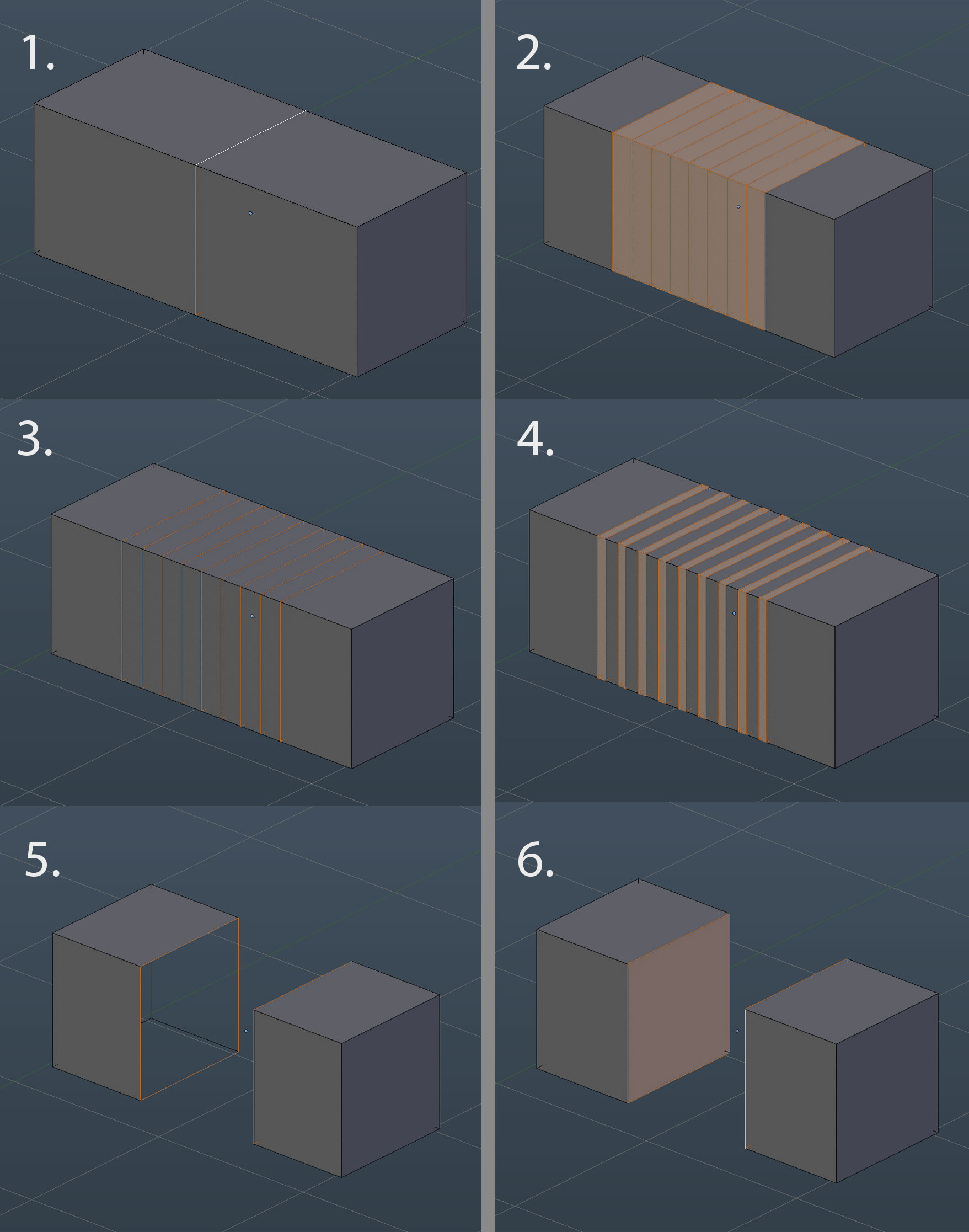
But I feel like it time-consuming in some points. Now it works like on picture 1 and 2.
First, it would be good if we will option what to select after BEVEL. If we can just select the loop edges(picture 2) without ring edges(picture 3). With the new option, you can do new bevel immediately. I know that I can make a loop cup and after bevel it, but the new method gives us more freedom.
And one more option for more "advanced BEVEL" will do not bridged bevel edge. (Picture 5). And just leave it open. After that modeler can press F and fill the open loop. (picture 6)
2 Comments
I would rename 5. to "Open Bevel" or "Open Chamfer" like in Max (correct me on the naming please). It would be lovely to see this, especially number 3. where you will automatically select the edges instead of the polygons.
tip: a workaround is to just "inset" these polygons to get a similar result.
@remosande: I am not a native English speaker. )) I just check about chamfer and bevel differences on google. There very precise pictures. What is correct. But story not about that). For simplicity, it just better to call one tool under one name. And all propertice under it.)