
Modifiers visibility in Outline
This is something I have always wanted but for some reason am just now proposing.
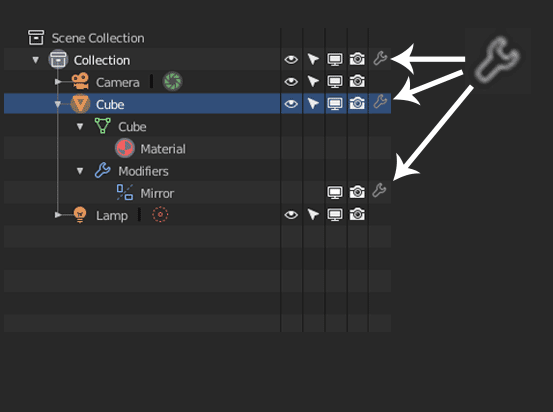
I think it would be really useful to have a Modifiers visibility option/icon in the outliner. This way could easily one click turn off all modifiers in the scene, or by collection or by that specific object
5 Comments
Yes, could be really helpful. Would also be a nice shortcut to open the modifiers just for that specific object.
That's something I always liked about Cinema 4D (even though I think they don't have it optimized enough) - the fact that you can see an overview of attributes of an object by looking at the outliner. The problem here being that tags/attributes stack up a lot potentially.
Maybe Blender could incorporate the types of tags customizable, similar to windows explorer: Have options which attributes are atually shown in the collection outliner :
@motionblur.of.doom: your trick is very practical and simple ... my opinion is positive about this possible idea
@motionblur.of.doom: That would be a great idea incase people want to keep things minimalist.
YES PLZ!, i need this!
this is what I have also proposed on devtalk
Outliner “hide and block icons zone” become a sidebar
Much of the time I work in two phases one of modeling-animate and one a shading - rendering. For this reason I do not need to have 4 columns of options available for the management of objects but I need only one or at most two, depending on the work I’m doing.I would rather have much more space available to see the tree of objects in the outliner. Then I propose to make the area of the icons that hide or block objects a sidebar with the columns that can be displayed that can be moved to preference.
By doing so you can add a column, which you feel is missing, which exchanges the individual objects or groups in wireframe, solid, etc …