
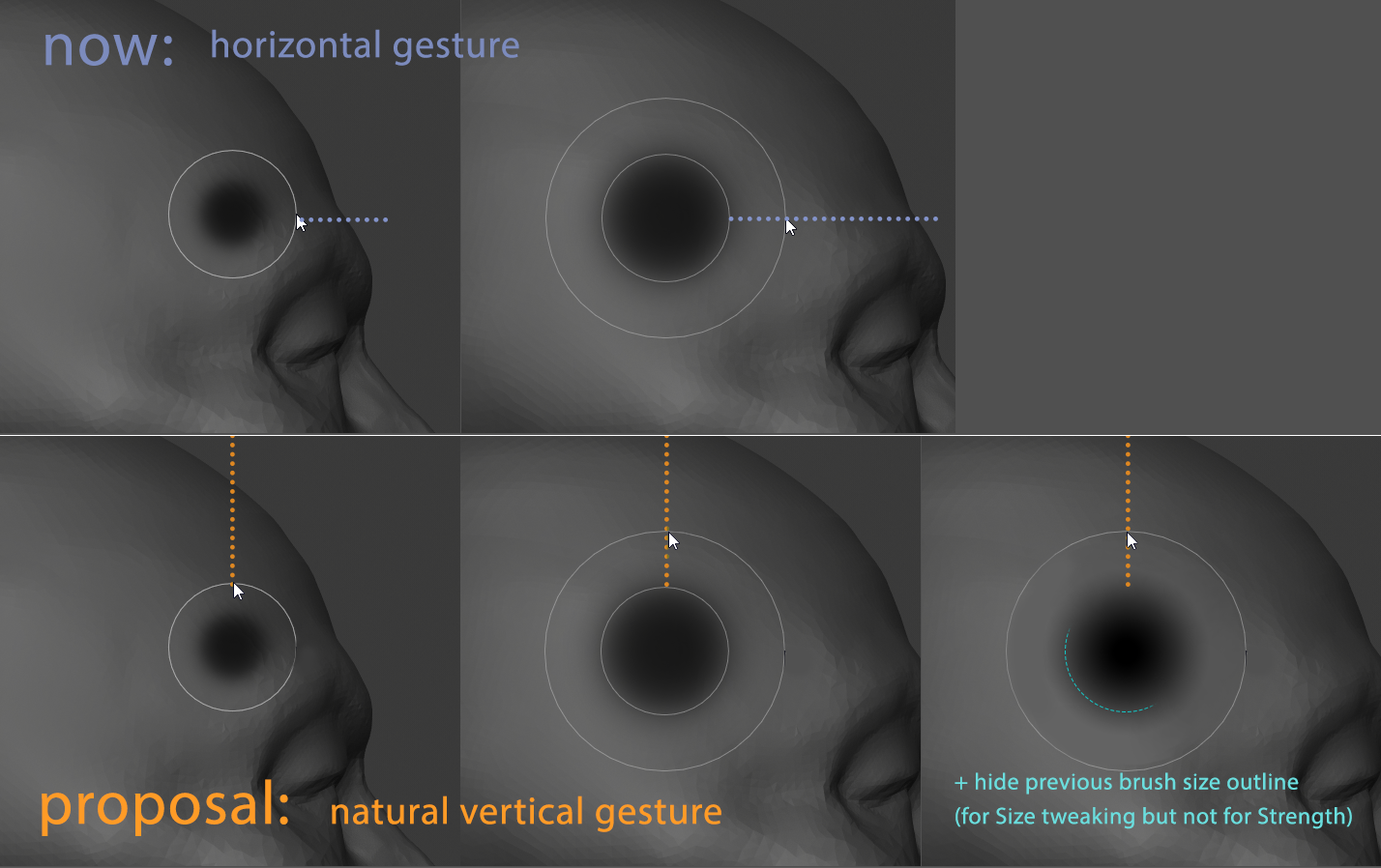
Add vertical gesture as alternaitve way of tweaking brush Size/Strength
Tweaking brush Size/Strength with vertical movement/stroke has more natural feeling to fingers/palm as it could be done with finger movement - compare how it's simplier to draw vertical line with pencil vs horizontal line - with horizontal gesture you have to activate palm motion. Also it would be handy for those lucky humans who use tablet monitors because you can see all gesture at once.
PROPOSAL: Add vertical gesture as alternaitve way of tweaking brush Size/Strength. Additionally for Size tweaking there is no need to keep previous brush size outline (while for Strength it makes sense to keep it).
TECH_NOTE: Technically all is requered is to change cursor position appearence from right side of brush outline to top.
3 Comments
github.com/jfranmatheu/Blender_NewSMUI/blob/master/README.md :)
* @J. Fran Matheu * Good! Thanks! But using single and espesially RMB for both Size/Strength does not suit well - sometimes it has unpredictable behavior jumping between Size or Strength tweak - it would be better to have separate keys per each property. But perharps this could be implemented with Blender_NewSMUI source modification.
I updated proposal with tech note saying about how it could be done, but we need someone who could do that in source code or at least point to it.