
restore the "none" display device
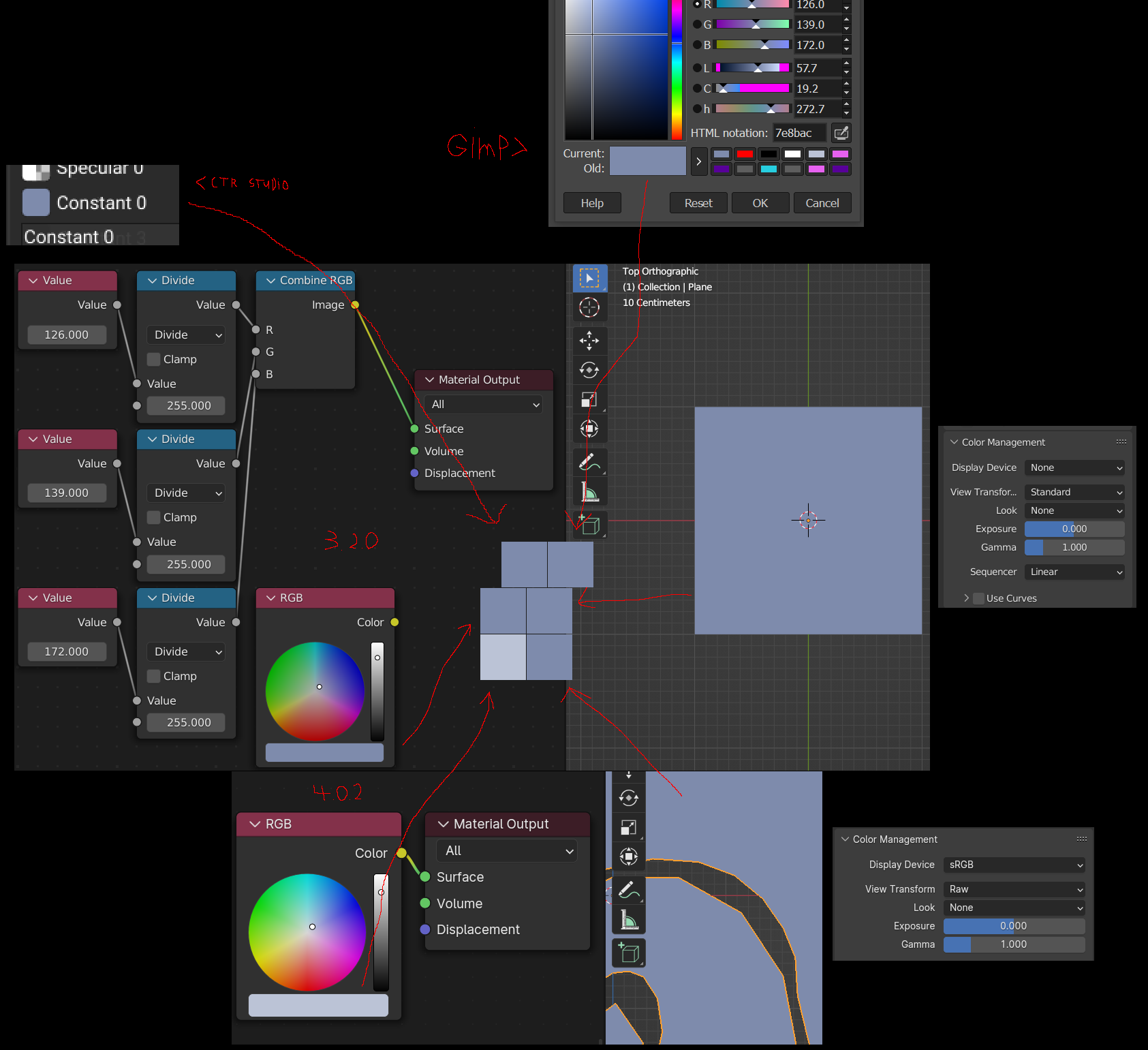
for context i dont use color management i dont need realistic colors for the things i render so i always set display device to none view transform to standard and look to none and set all textures to linear all that meant that colors were consistent across all my programs id use
updated to blender 4.0.2 and the none display device is gone i can get the actual colors back in the viewport by setting display transform to raw
but then the colors displayed on the ui are still the srgb colors i want to stress that like this you cant trust what the color the ui displays
imagine a image editing program that displays one color in the ui but paints with a different color pure madness
so yeah bring back the none device
also change vertex colors to be displayed in the current color management space instead of JUST srgb
converting to srgb is easy
converting back isnt
3 Comments
I strongly recommend against using a non-linear working colorspace.
However there is a very strong need for a "sRGB gamma ONLY" colorspace. This means that the working colorspace (ie primaries, whitepoint, etc) is used, but sRGB gamma is applied. This is the space that can be converted from an 8-bit input image by a 256-entry lookup table of floating point values that is reused unchanged for every color channel and reused if the working colorspace is changed.
This is the only colorspace that can restrict the values to the 0..1 range and still use the entire gamut of the display. I think a lot of colorspace experts are downplaying how important this ability is to most users. The inability to do this is a huge frustration for anybody trying to start with professional-grade software.
This is also the "colorspace" that most other piece of software on the user's computer is doing. An obvious example is "I want the viewer to show exactly what my browser will when showing the rendered image". A more insidious example is "make the eyedropper work precisely when I pick from this other application".
It also means that converting between some random sRGB value and "working color space" is trivial and does not require knowledge of the working colorspace primaries. This makes a lot of user interface stuff (such as those vertex colors) work correctly without the need to get the UI code to know about the colorspace. They just know how to convert between 8-bit and floating point and do this conversion all the time.
got a manual fix in blenders files go to \datafiles\colormanagement and edit the config.ocio re add
None: - !<View> {name: Standard, colorspace: Raw}and editing active_displays to include noneand bam no more color management crap doesnt fix the vertex color problems though
Thanks for the temporary fix, do you think we should open bug-request, as it is somewhat an important feature of blender that simply doesn't work anymore (this fix doesn't work for exporting tiff from image editor for example)