
Blender BGL module deprecation message - add information about the addon that trigger's it
Currently BGL module deprecation message looks like this.
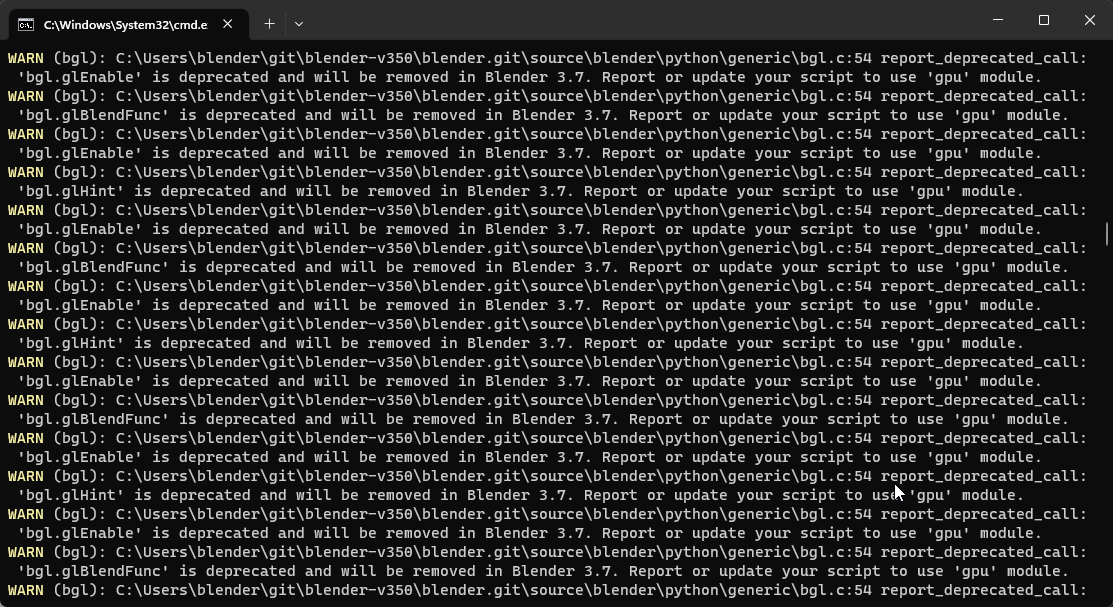
In Blender 3.5 it sends 100 of those messages (which is fixed in 3.5.1) but the message is still not very descriptive and it will take some time disabling/enabling addons to figure what addon is triggering it.
It would be nice to have this message to appear only n times (1?) per each addon with mentioning the code or the addon that triggers it.
Mentioned it here: projects.blender.org/blender/blender/issues/105997
10 Comments
The file and line number when could be detected is reported in the info editor. It wasn't added to the console due to the performance impact it can have. As this message is only shown to the user when running with the metal backend we could defintly improve.
The biggest issue is that it is development, which is just for a single release. So don't think this has a lot of priority against the other tasks on our list. If anyone want to give it a try, please go ahead!
Couldn't find any info about it in info editor :\
a bigger concern and slightly tangential topic is how they will ever deprecate BGL in the first place- from what I can see there has been almost no effort by addon developers to move from bgl to gpu, often because gpu is still lacking 1:1 feature parity with bgl.
This has been discussed, feedback was gathered and the gpu module was improved.
You can read your statement as: Users want to use new features provided by their GPU, but add-on developers don't want to because it requires them to use a different paradigm.
Imo add-on developers have been given all the support to migrate and give feedback to the developers and these have been addressed. If add-on developers haven't done so, it isn't about the gpu module lacking a specific feature, but mainly how to address these features or that they haven't checked how to do so.
Fair enough, I was following along with the BGL deprecation discussion for a while but have not checked recently. That said- when so many addons are still using BGL this close to the sunset date you have to wonder why they have not switched over yet. It could be symptomatic of a greater issue, some BGL feature that was not covered in feedback, or perhaps some lack of understanding on what they need to do to update their addons for GPU support.
Personally, all of my addons have been updated to use GPU, but I did run into one missing feature that I used extensively (bgl.GL_LINE_SMOOTH_HINT, et al). When I asked about it I was told to write a custom shader pixel shader.. okay cool. kind of a blow-off answer, but I did. I'm not sure if there are other similar features that are missing that could be turning addon devs away from upgrading, but there's one example.
My point being- if addon devs aren't updating, you guys should really be asking yourselves "why?" and not just assume people are being lazy.
Yes, it is also on my radar.
Issue is that we cannot track random add-ons/scripts from the internet. So we are only aware of add-ons who are commonly used by users that are willingly to report it. Looking at blendernation, blendermarket and other market places typically used, new add-ons appear on a daily basis. We cannot keep track which one of them uses a specific feature and requires an update.
We also improved the smooth line issues by introducing the POLY_LINE shaders. This should remove most custom shaders that just want smooth lines. I wasn't aware of them, and might have pointed people in the wrong direction once. Sorry about that.
I hope I didn't give the impression that we find add-on developers lazy. That is totally not the impression we have or the message we give. Communication should happen from both ways and communication is hard too do correct especially as we want to be an open community.
Fail: I tried to like your post, but wasn't able to :-(
Btw is there some example of code transitioning from
bgltogpu? Wanted to replace somebglstatements I've been using likeetc and was looking for a easier way to do it without diving into opengl and writing custom shaders
I also am looking for this. Particularly the
glBlendFuncone. For some, you got the answer for this stackoverflow question: Addon stopped working on Mac/Metal in v3.5+ due to shader compile error. Console spam errors about bgl.glEnable callsSerious question: why not disable and reenable your add-ons one by one, until you find the culprit?
Everyone checking that way for the same thing is kind of cumbersome.