
"Lock", "Watch" and "Update" modes for individual panels in the Properties View.
Case
Blender has a properties view with tabs and panels. Great. One tab can be pinned. Panels can be collapsed/open. Ok.
When you pin a tab, it either pins a global tab or pins a local object tab. It also removes the other tabs once pinned. It becomes a realestate hogging panel that doesn't update on other selections till I divide up the UI more to get more property copies and pins among multiple objects in the UI. I loose access to the rest of the Properties view in that area once I pin.
Elsewhere in the UI, you can pin, move around and organize panels within tabs. When you pin a panel, it stays fixed between tabs, regardless of selection. This is great. It even updates when you change selection. They "watch" what is selected and panels become global, even when changing tabs. Great. I can mix workflows. Unfortunately, you can't "pin" a panel with properties of a selected object.... no consistency!
TL:DR Currently, the panel/pinning workflow in the Properties View is inconsistent with the rest of the UI and it's is slow, and... annoying.
Task
-
Add a panel pinning in the Properties view and remove the entire tab pinning workflow - and add option to pin panel to object or just pin to global areas. When pinning to local object, it will display that object name in the panel header.
-
Add ability to "lock" panels in the rest of the UI to specific objects, reminiscent of how locked panels in the properties view rememeber that particular object tab.
In simpler words:
- Add a panel pinning "lock [to local]" and "watch [to selection + keep panel global through all tabs]" modes in the properties area.
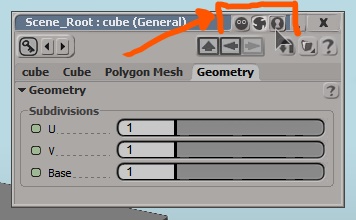
Example (from Softimage): You create a property panel view. This view has tabs and panels. You tell the panel to "Watch" - which locks the panel in place and when you change selection, the panel properties update to that object. This panel is in all tabs now. If you tell the panel to "Lock", then the panel locks in place with the properties of that particular object exclusively - similar to the way the properties tab lock works (except only for that particular panel). This panel is in all tabs, and from that particular object. If you want the panel to unlock, you tell it to go to the "Update" mode and it will snap back to it's original tab and move out of other tabs and update to selected.
Pro's Making drivers can now be a system of drag and drop between locked panels - a feature for another task. Rigging bones/armature properties AND changing their constraints can now be setup to be in the one and same Properties GUI (not 3 seperate tabs) Panels under a "watch" mode - update when you change selection. Panel under "locked" now have a nested panel and it's properties directly accessible to the "Active" selection. Panels under "update" are like normal panels - isolated to a single tab and updates on selection. Will be consistent with rest of UI - especially with the toolbars everywhere and their tab systems. Open up the possibility that a pinned panel with "watch" can be used to modify settings, colours and other properties to selection - and/or define if it's just to that one object that's locks to that panel.
Con's Doesn't resolve the issues that tabs are both local and global in the Properties view with no way of knowing which is global or local - bloating properties and creating confusion Doesn't resolve the issue that modeifiers stack can't be pinned (though each modifier could be with indicators that pinned "Watch" modifier is disactivated on current selection) UI for locked panels needs a nice way to tell you what it's locked to in the header - which might be chaotic
Arguement I just hope to unify the tab/panel workflow and make it more flexible - as much as the rest of the UI. I shouldn't need to divid my screen realestate to get to the right panels without having to switch tabs - I shouldn't have to lock the whole entire tab on an object to access it's particular properties.. It can be better.
0 Comments