
PBR workflow improvements
PBR Workflow Improvements
Blender already has a lot of functionality when it comes to PBR material creation, but it lacks in workflow and UI.
Proposals:
1. Seperate Material editor from Shader editor
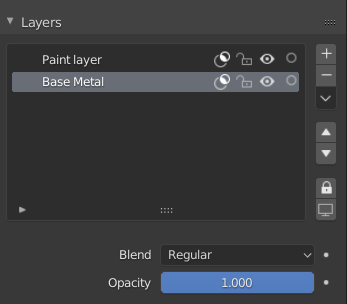
The material editor is a layer based system similar to Grease Pencil Layers. There are 3 types of layers that can be added:
-Material Layer: Adds a base material with all the channels that are used in the texture set
-Paint layer: Adds an empty paintable layer, this will allow to paint on any channel(s) on top of the underlying layers. Paint layers are similar to image textures, except they are stored inside the .Blend file and have a resolution specified in the Texture Set Settings.
Paint layers can also be used as a black/white mask
-Adjustment Layer: Adds an empty layer similar to the paint layer but allows for easy adjustments using nodes found in the ‘Color’ category of the Add menu

All layers have the following common properties:
-Visibility toggle
-Mask toggle
-Locking Toggle
Per channel properties:
-Opacity slider
-Blend mode
Paint layers and Adjustment layers can also be added inside Material layers
2. Automatic Shader Setup
The Shader Editor automatically sets up a PBR shader based on the used texture channels
(based on the Principled Shader),
The standard setup would be the following:
 any input of the principled shader could be used as a channel. In case channels such as Opacity, Subsurface scattering and displacement are used the settings will automatically be turned on:

2 Comments
I would like to know what Pablo Dobarro thinks about this
This is multiple proposals bundled into a single post. Please separate them into individual proposals so they can be discussed and voted upon independently.