
Make Object to Emmit Guiding Lines (Edit and Object Mode)
Hello Guys. Recently I suggested for blender to make some guiding lines with an additional ruler function for the viewport. I have discovered a new idea which I think would be cleaner, more useful and efficient.
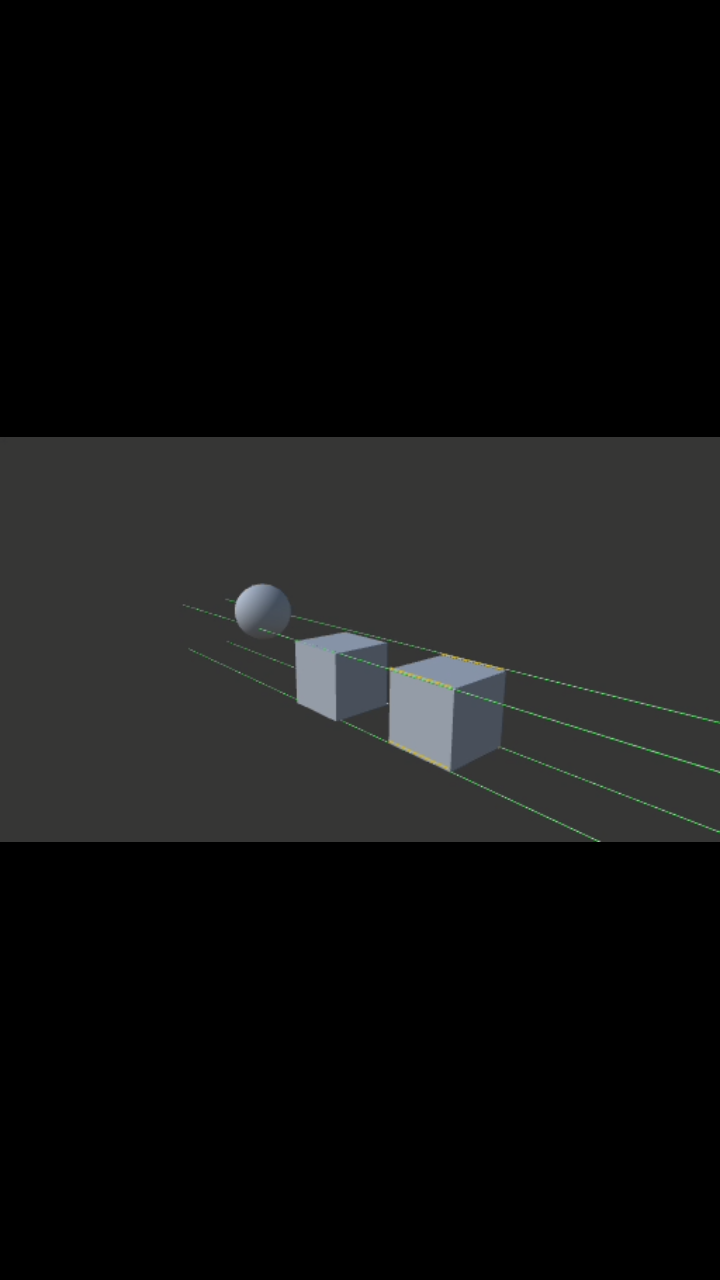
The Idea is to make an object as the origin for the guiding lines. I believe to make it an option in the right click menu would be nice, where you just select an object's specific edges or vertices and make it as the emitter of the guiding lines( The lines lenght and thickness can be adjusted for the purposes, ex: aligning edges of multiple objects. There are options for the number of lines emmited,angles, and lastly you can have an option to make those guiding lines have an option to produce data in a specific point like rulers.) I know I am taking this a little bit deeper but those simple guiding lines will do.
Now when it come to deciding where should the lines be placed, One would be in the center or selected edges, and vertices of the object.
Thanks.
8 Comments
Might want to check out the "Measure It" Add on. I believe it's standard in Blender now, and it's listed as working in 2.8.
* @ammusionist * Dude. That would be nice. If it is close to what I was looking for, I don't have to wait for blender to make this thing then. Thanks, I will look into it.
* @ammusionist * Pardon me. It is a nice addon bot itis not what I was looking for. The title and terms mighr be the reason for some misinterpretation. I have reedited my title.
* @johnpdelacruz26 * Perhaps you could mock up a screen shot of what your suggestion would look like in practice?
The image that I uploaded is just a rough idea on what it supposed to look like.
* @johnpdelacruz26 * That makes it much clearer.
Like having guide lines in a 2D graphic prog. Should probably look at adding snapping for Vert / Edge / Face / Origin along the lines in the Snap To options.
* @ammusionist * Yeah. It is just nicer to have it ready when you need it and no need to create a line, edit it, transform, then snap it, and what not.
* @ammusionist * Guide lines are great ! You have that in Sketchup to help you placing objects precisely. In Sketchup, guide lines are objects that you can place where you need them. It is not only for 2D apps.