
Simplify Object hiding
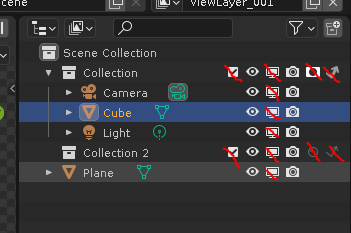
There are three ways to hide objects. It's overcomplicated and needs a cleanup:
- A "Tick" icon on collections. (Include in view layer)
- An "Eye" icon objects and collections. (Hide in viewport)
- A "Monitor" icon on objects and collections. (Disable in viewport)
There are differences between them, but not enough to justify having separate buttons. From the users' perspective, these differences are not even that clearly evident in everyday use.
The Tick. Disabling "Include in render layer" is practically the same as disabling both in the viewports and disabling in the render. This can be done with the eye icon, and the disable in renders icon. There may be nuances that I can't even think of, but definitely not enough to justify the existence of this button. These can be solved differently. Back when blender had a different layer system, this tick made sense, but not anymore.
Conclusion: The "Tick" icon may not exist. View layers may remember the states of both viewport display, and disable in render toggles, and each View layer could also have their own unique animation tracks for these toggles (Currently animating visibility of collections is impossible). For convenience, there could be a possibility to toggle both of the icons at the same time, when holding "Ctrl" or "Shift" and clicking one of them.
The Eye. There are differences, but the "Hide" and "Disable in Viewport" buttons are way too similar to justify their existence as different buttons. There only needs to be one of them. Since the "Disable in viewport" button does slightly more than just visibility, it is slightly more useful. Alternatively, there can be a separate toggle "Disable instances" in the object tab, which is one thing that "Disable in viewport" does, but "Hide" doesn't.
Conclusion: The "Eye" icon may not exist. However, since "Eye" is a more universal, easily recognised icon for hiding things, the "Disable in viewports" should change it's icon to "eye".
Before Blender 2.8, there was no "Disable in viewports" icon as separate from "Hide". There was only the "eye", and it worked completely fine. Adding a new button did not solve any existing problem that i know of. All that did was added slightly more needless complexity.
Another thing: Disabled in Render, Holdout, Indirect only. Only one of them is possible at a time. So why aren't they connected? Currently, we have a different column of icons for each of these toggles in the outliner. Instead, The "Disable in render" icon may have four states, which the user would cycle through when clicking it: Enabled, Holdout, Indirect only, disabled. Alternatively, there could be two columns "Disable in Render" (on/off) and "Render type" (Full, Holdout, Indirect only). A test on how that feels like in practice would tell which is the better option.
So.... if this proposal is fully followed, at most, four unnecessary columns can be perminently removed from the outliner, saving space, and decluttering the outliner:
2 Comments
Why dont you just filter out the ones you dont want? i.imgur.com/swg5xAt.png
I am not looking for a workaround. As a fan of blender, I want blender to be designed the best it can be. Having a bunch of different buttons that all do essentially the same thing is needless complexity and that's NOT good design. It can be simplified very easily without any drawbacks that I know of.
Howbout we add even more icons, like "glasses", "binoculars" or whatever, that also do the exact same thing? The user can filter them out, so why not, right?