
Make the graph editor View/Modifiers/F-Curve tabs discoverable

I love Blender and it keeps on getting better, but one aspect that still needs attention is discoverability. So many things I do within Blender you can only find out by being explicitly told about or find in a tutorial video.
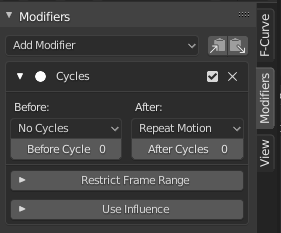
One powerful aspect of the graph editor are the modifiers that you can use to cycle animations, add noise, etc and yet as far as I can tell it's nearly impossible to find without being told, and even I have trouble finding them sometimes.
As shown in the gif it only appears if you BOTH:
- Have the hidden N panel open
- Select only ONE point of an animation curve
This is a very specific action that equates to a hidden menu hidden with a specific action. The N menu when closed is hard to find, but at least you can see the small arrow to open it, however there is zero indication that there is a hidden modifier menu for curves. Even if you are only selecting points on a single animation curve, if it is more than one point then this hidden menu doesn't show.
I propose:
- Showing the View/Modifiers/F-Curve tabs at all times, greying them out if they can't be used
- Show the tabs if you are selecting multiple points of the same single animation curve
- Some other way to show these tabs even exist
1 Comment
Discoverability abd also accesability. I hope there would be an option soon that would allow users to use the header as the clutter area where all the buttons/shortcuts you want to use would be easily placed in plain sight at tye viewport. Currently blender relies highly on shortcuts and hidden menus. This is optional because there are also a lot of people who likes their viewport minimal as possible.