
Sculpt: Mask Mesh Boundary & Mask Face Set Boundary
This is a request for two very common masking commands... The good news is, the core functionality seems to be present in blender already, but unfortunately only in the form of automasking... I'm talking specifcally about the "Mesh Boundary" and the "Face Set Boundary" automasking functions... Those automasking functions are very useful for the obvious reasons, but being automasking only it has many usage limitations as we can't access the mask itself and use it as a starting point for something else...
So for flexibility reasons, it would be great to have those automasking functions as regular mask operators too..
Here's how those operators should work:
Mask Mesh Boundary operator:
All this operator should do is mask the edges/points of an open mesh.. Just like the Mesh Boundary automasking function. But unlike the Mesh Boundary automasking function, this operator would give us the regular visible and editable mask. Giving us the ability to freely manipulate and modify the mask further (e.g. invert, grow, shrink, smooth, erase in certain areas etc) which is the crucial part and impossible to do when using the automasking function...
Here's a simple example of the effect of running this operator on an open mesh:
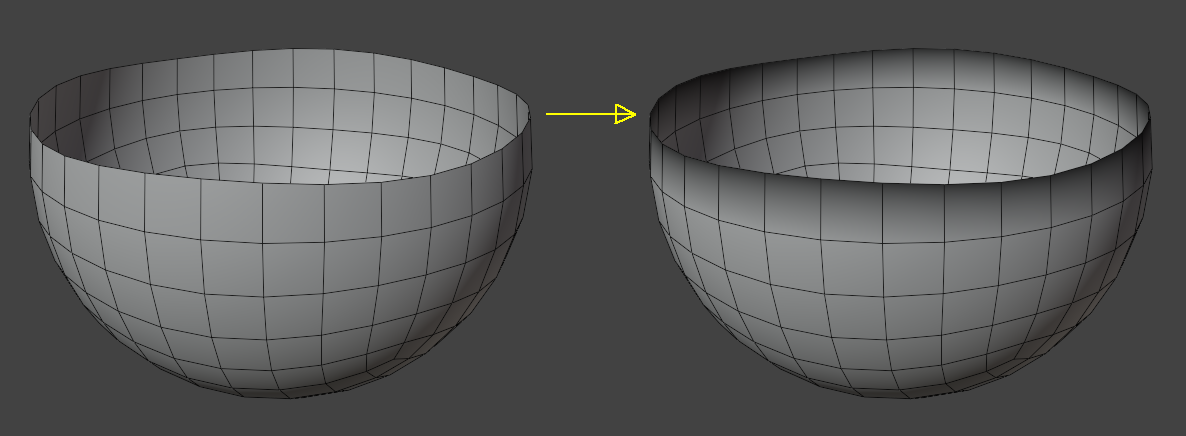 As you can see, the border edges/points were masked. I hope you can see how useful this is on complex/irregular/hard to mask meshes... 😉
Another very important aspect of such "Mask Mesh Boundary" operator is that it should also work on partial hidden meshes... So in a situation where a part of the mesh is hidden, if I run the "Mask Mesh Boundary" operator, the border edges/points of the visible mesh are the ones that must be masked..
This operator does nothing on closed meshes..
Mask Face Set Boundary operator:
Like the Face Set Boundary automasking function, this operator should mask the vertices that belong to a face set boundary, but of course, as an operator it would give us the regular visible and editable mask as well, for the same flexibility reasons...
Here's a simple example of the effect of running this operator on mesh with face sets:
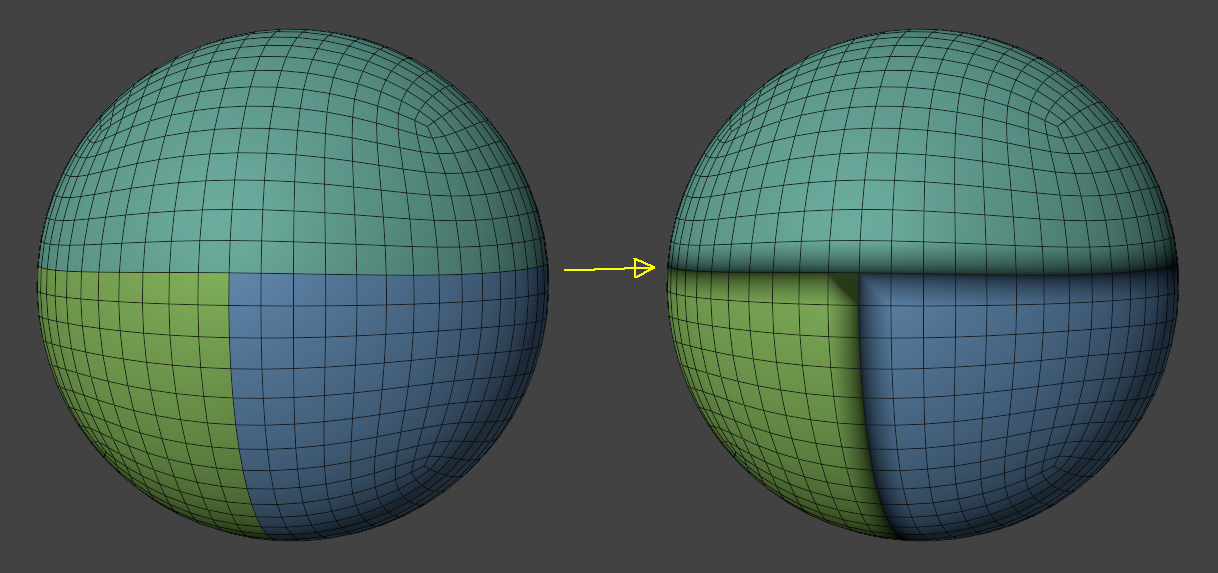 As you can see, the vertices that belong to a face set boundary were masked... Very handy..👍
This operator does nothing on meshes without more than one face sets touching each other..
Thx...
5 Comments
Thanks for writing this up - the main question I have from a functionality POV: What would you expect behavior here to be if the mesh already had some kind of mask on it? Would this be an additive operation or would it completely replace current values?
Sorry I forgot to write that part... But yeah, the operation is additive. If the mesh already has some kind of mask, it will just add to it..
This is very useful ✅
+1
awesome awesome awesome