
Viewport / Overlays / Normals
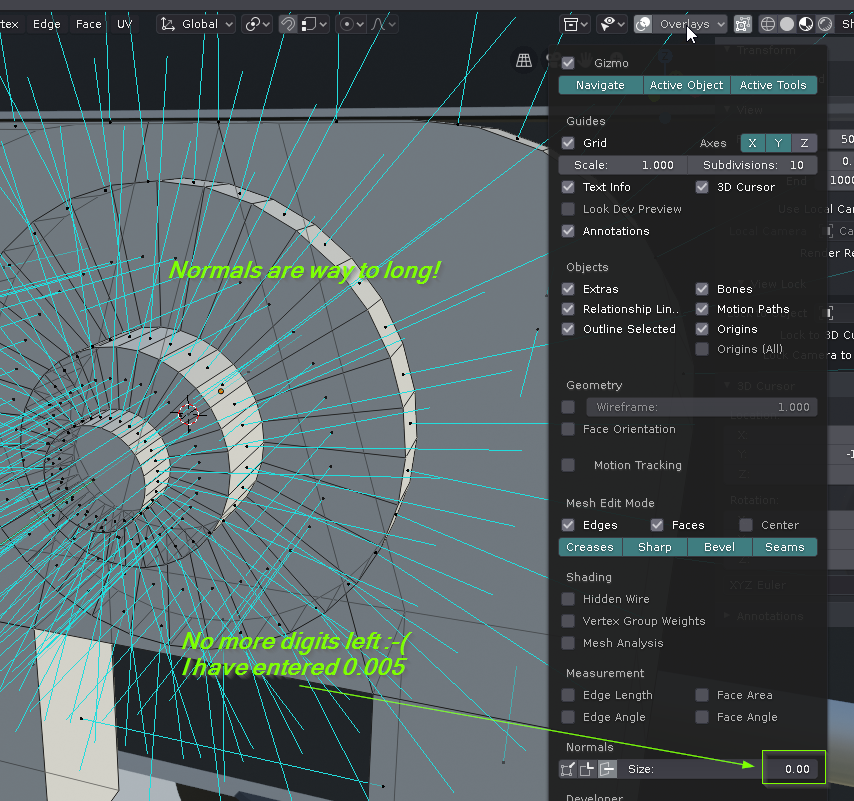
If you are working below 10cm the range of the input field of the normals display size is to low. It is indeed possible to enter values like 0.001 by keyboard but the input field has to less digits to show the value... So please increase the number of available digits or give them a unit like m/cm/mm
14 Comments
While on the topic, another idea:
Dynamic/relative sized normal lines which always take up the same amount of screen space. Example: you set the size to 0.5, click a lock icon (preferably in the size bar) and no matter how far zoomed in or out you are they always take up say 50 pixels.
Dunno if this would be a worthwhile addition, just wanted to throw this out there.
* @Lonke * Yes, I agree. An absolute screen-size of the mormal-lines would be it! Look at this: the gizmo is also always the same size! No zooming nor sizing of objects alteres the gizmo-size! Exactly this ist the way, the normal-lines should behave, I think!
Short speech: I would be glad if the length of the normal lines are independent of the size of the object and independent of zooming. Just like the common gizmo handles are. The "Size" value should be in absolute screen size.
Are you sura that you have the transforms collapsed?
But the default size is correct:
The issue is that you're modeling in a very different scale.
As for units, you can write m / cm / mm in the input field to indicate in which unit scale you're using.
Is it possible to use units in the Normals scale box?
Have you tried entering 1mm for the Normal length
* @ammusionist * No, units are not welcome in the normal size input box... ;-(
Not sure it's normal behavior then. Maybe a bug that needs to be reported.
* @-L0Lock- * I am reporting it here ;-)
scale your object up 3 times should change normal size
* @othoap *
* @othoap * Hey, I don't want to scale my work to see a simple overlay in proper size! This would be totally away from the sense of overlays, won't it?
* @eno.kahl * as far as I know, this particular overlay shows the normal's direction and there's an option to increase or decrease the length of the overlay line. Nowhere does it promise to scale up or down with your model, I think? Something else is, have you applied your current scale? How can the normal overlay know which size to be if the scale hasn't been applied? just thoughts
* @Pedro Rubini * I think a "smart overlay", as you're suggesting, is a great idea though!