
Sequencer Tabs for a better UI
Some time ago I put together some ideas to improve the VSE, looking at each type of strip and the overall Sequencer workflow. I did an interactive page to present them. Please, check this link: Dropbox: VSE Improvements . Below is a short for the Tabs idea:
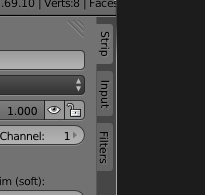
Tabs organized by workflow
The many options in the Properties Panel (N) of Sequencer can make scrolling an unwanted best friend. I believe that Tabs can be a better way to use the few vertical space we actually have in Sequencer properties panel. It's ease to get lost while scrolling the many options, so by grouping them by their moment in a workflow we can find things easier.
The proposed workflow: Setup, editing and post. The idea is that these moments are independent and while doing one of these, other options non related could clutter the interface.
Strip tab
For output strip options useful while editing (
See more
.)

Input tab
For input strip options useful for initial setup (
See more
).

Filters tab
For post-production options (
See more
).

Every setting should to be placed according to [most] appropriate step in this workflow. So some of them should go to another panels, like the Trim options (moved from Edit to Strip panel), that seems to be related to the editing process rather the initial setup.
And since we're trying to gain vertical space, a complete redesign of the Panel may be convenient. Check the Sequencer Painel Redesign idea.
Thank you for reading it, please like it if you like any of these ideas, and be free to discuss them.
10 Comments
I think, this might help but it will add one more click to your workflow when you want to use a feature from another tab. There should be a "favorites" tab as well which includes all Panels that you can check optionally.
It's a valid point, thanks for commenting. You can scroll also in the tabs buttons to change tabs. Please try it in this interactive HTML and see if it can help.
There is the pinning feature supported by panels in tab areas, so you could to pin panels to try to replace a favorites feature.
Could be marked as done, as the panles have been reworked in 2.8+
Bforartists has implemented tabs like this into the VSE by default. I like how this one is more refined. I wish I could talk to you more in person, I'd love to have your development into Bforartists fork - it also needs love.
I think that we should just extend tabs to work on all "UI" (properties) regions in all editors, instead of restricting them to the Toolbars only. For instance, the Properties region in the Graph Editor could also do with this. (In practice, adding support for this region in the Sequencer will end up opening the way for all the others anyway)
Having checked on this before, technically it's just a matter of:
-- (2) Convince UI team to allow this to happen -- 3) Everyone can start playing around with the best ways to define the categories for each editor. It's like 1-2 lines of code per panel.
I guess the real hard part here is deciding what to put in what categories! (Counterexample - MsOffice Ribbon)
Just a little heads up: You can start playing around with adding these for the sequencer now in latest master/buildbot builds. It should be possible to do it just like how it's done for the toolbars :)
I think that I agree with most of this proposal, the tabs would at least make the VSE uniform with the other editing windows. It would be nice to split the panel so that you could have multiple tabs available but I guess you could always spawn another instance of the VSE and shrink it to just the tabs panel.
The idea of keeping simultaneous tabs is difficult to justify, because it brings the doubt about the need for tabs itself, but I share your thought about it and I think it would be a great feature to be able to “pin” a sub-panel in any tabs panel in Blender, so it keep showing atop the tab sub-panels. Don’t you think so?
You can pin panels: blender.org/manual/interface/introduction.html
Except for the VSE panel that is. I usually just spawn a duplicate VSE window and resize it to fit only the panel then scroll it away to a new sub pane.