
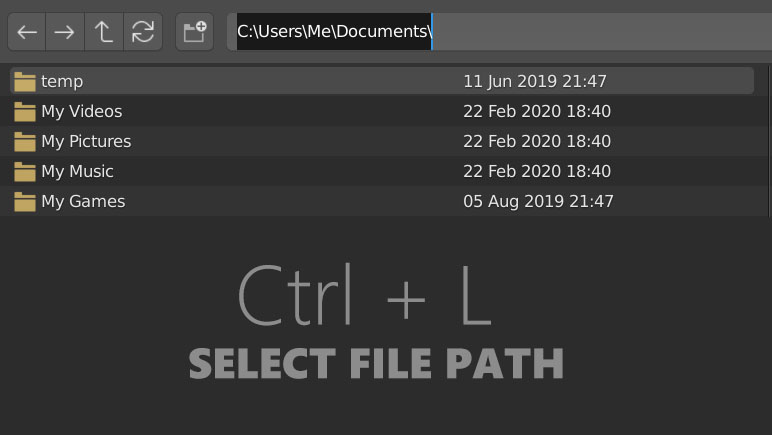
File browser: Enter Path with Ctrl + L (Windows convention)
The file browser is an essential part of the workflow for artists who are using Blender for production. For our workflow, we are pasting directory paths dozens or hundreds of times per day. In Windows 10, the shortcut to select the file path field in Explorer is Ctrl + L. On macOS, it's Shift + Cmd + G. There's currently no analog in Blender so you have to click on the field to enter a path.
Ctrl + L could be added as the new should be added in Windows Master as the new shortcut for selecting the file path field in the file browser in conformity with the Windows shortcut convention and for efficiency's sake. There is no conflict with the existing 2.8 keymap.
10 Comments
This is also standard in all web browsers.
Very much agree. Ctrl+L is the standard in many file browsers, from Windows Explorer, to Nautilus/Files in GNOME, Dolphin in KDE, and many more! I would use this all the time.
This is done and should be available with Blender 3.3, release planned in July 27th.
See rB209bf7780e7c
Alt-D also seems to be a kind of standard on Windows...
* @Ivo * That's true. It's a duplicate shortcut for Chrome and other browsers as well. Thank you.
It's done rB209bf7780e7c should be there in 3.3
Not sure why it is needed, single click selects entire path by default
* @Paul Kotelevets * Efficiency and industry-standard conformity.
* @Ethan Hansen * longer does not mean efficient Actually, it is opposite. And yes, there are a lot of weak solutions in industry standards, because they are ancient.
* @Paul Kotelevets * When you've been using CTRL+L across so many programs it's really become an automatic reflex. I was surprised that it didn't do anything in the Blender Filebrowser.