
Selecting groups as single objects
DESCRIPTION:
For the speed and comfort while working with scenes with a large number of groups, enable an option for selecting a whole group with a single mouse click in the 3Dview, just as it was a single object. This would replace current LMB click / SHIFT+G / select grouped. User would access particular members of the group with CTRL+click or double-click to enter the group and edit the members.
WHERE:
A switch in the User Preferences dialogue (Editing or Input tab), with two options:
A - existing group interface (current Blender grouping system, for users that are used to it) B - single-click group selection (select and manipulate group as one object)
EFFECT:
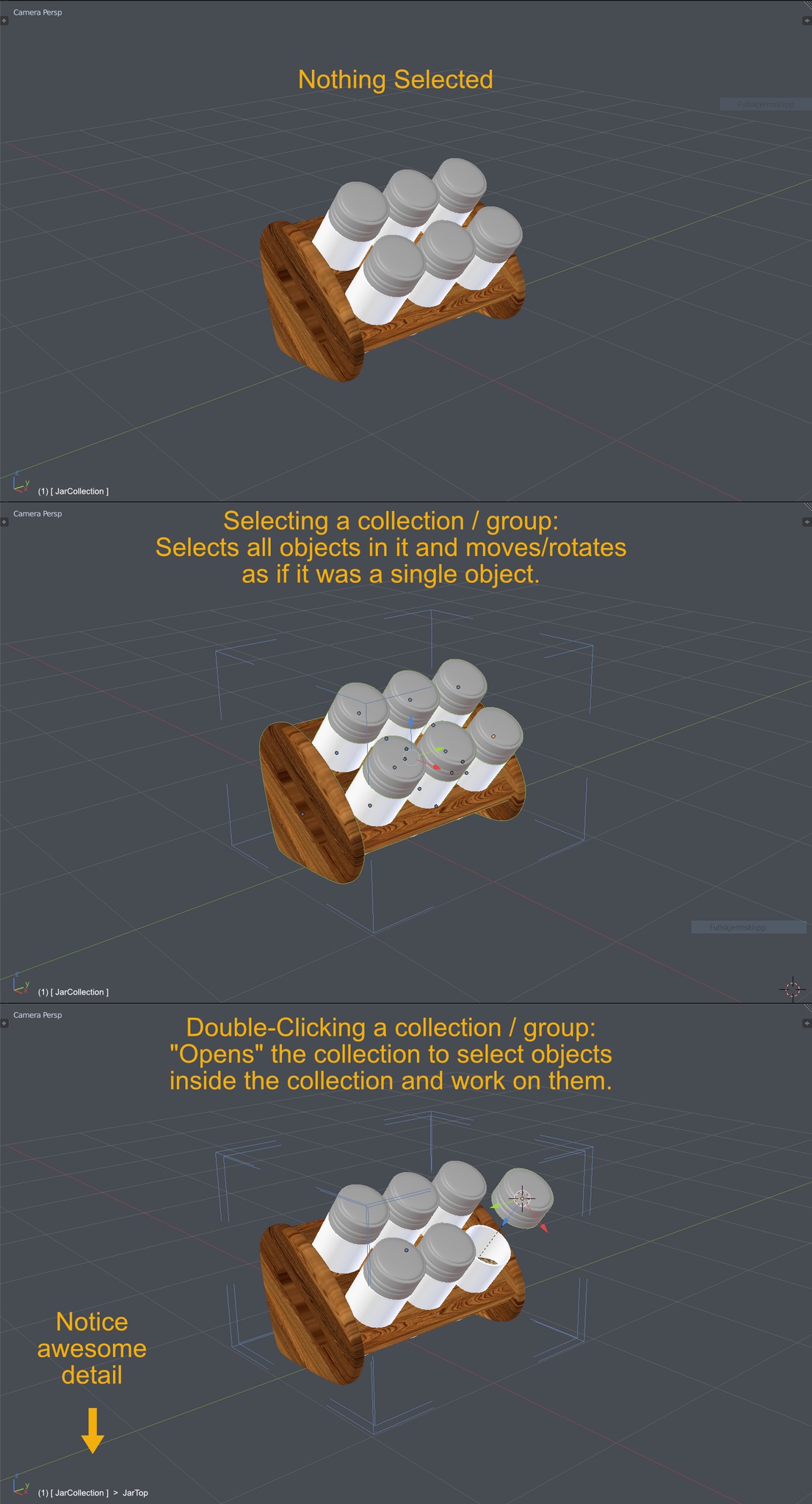
If this option is enabled, user can select any group in the 3d view with a single click on a member of a group, as it was one object. Selecting multiple groups - the same as selecting multiple objects - SHIFT+click
Here's a mockup by Ejnar Brendsdal (the model by José Petri ( www.josepetri.com ) from BlendSwap):
6 Comments
I would like to see this proposal with a swich button between "default byobject select" and "entire group select" without key modifiers, except keys that allow to enter/exit from groups. TAB is entering the group level, SHIFT+TAB is exiting group level.
And, finally, forget GroupPro as a nightmare
@1d.inciner: Hey 1D, glad to hear from you. Thanks for the support. It seems that this 'group' initiatives are getting some momentum. F I N A L L Y.
There are actually more than one of these similar suggestions here, it seems we were unaware of each other. You may want to check out this old thread by Pawel Lyczkowski, it speaks of a very similar thing and it's rating is 76! If you haven't already, you might wanna upvote it:
blender.community/c/rightclickselect/Rcbbbc/
Yes, nice proposal. Having a background in Max, Modo and Lightwave, clicking on an object in the group/collection and automatic selecting all objects in that group add a lot to scene management and keeping a good overview. Especially with very large scenes. Which I need to handle daily.
A lot of starting people are rapidly confused by only having collections acting as groups. In other software there is a distinction between groups and layers. Which makes scene management a lot easier. But each software has it strengths and the above proposal would do a lot. Although not sure how nested collections would work then without a dedicated group systems Blender now sees as collections combined with layers.
I found this add-on the closest to what you described above: github.com/machin3io/MACHIN3tools
Hi Ejnar, thanks for going through the proposals. Man, i miss these features so much in dealing with architecture.
That could be nice - resolve excessive steps for detaching a member at the same cost. However, if the member of the group is another group and user wants to dissolve that smaller group, he would get in the conflict of intentions if the same command is for detaching from the big group. Perhaps a dedicated SHIF+ALT+G for detaching, or something like that.
Yeah, something like that - dig your way through the hierarchy, edit and then ESC-ape your path to outside again. Just like in real life.
ALONG THE LINE:
What do you think, should we make some kind of a new, integrated proposal to refresh this notion, with all of these procedures outlined, along with some illustrations? We could risk the loss of the upvote count by starting from zero, but then again, maybe the visibility and the coherence would make it popular?
@Okavango: I think we can edit this post and get the best of both maybe? There is a lot of excessive information here.
But first step might be to catch the attention of a core dev and figure out if this is even possible. It would seem so in my eyes but it requires some rethinking of the workflow and with all the 2.8 work going on it seems much of it is already settled upon. It might be difficult to get this into serious process..? maybe @Dalai Felinto ??
@Okavango Lets keep the discussion in here:
As you mention there are many ideas involving this and I comment on each of your ideas inline:
Idea: CTRL+G - creating a group that behaves as one object Comment: I like it. Its consisten with many other apps.
Idea: CTRL+SHIFT+G - dissolving of the the group Comment: Yes. Maybe if you are in the group edit mode it will remove the selected objects from the group?
Idea: CTRL+SHIFT+ALT+G - dissolving the group together with all nested groups Comment: Yes. Its hard to so so it wont happen by mistake.
Idea: ONE CLICK SELECT - selection of all objects inside the group, as if they were one object Comment: Yes!
Idea: CTRL+SELECT - selection of a particular member inside the group Comment: Yes!
Idea: NESTING - groups inside groups Comment: Yes!
Idea: INSTANCING - SHIFT+D to copy group without linking, ALT+D copy instanced (linked), as it is with ordinary objects Comment: Yes! This is consistent with Blender in general and works smooth for most blender users i have talked to.
Idea: EDITING - TAB or DOUBLECLICK for entering the edit mode. Editing an instanced copy of a group edits all linked copies (just like dupligroup instances now in blender), with the difference you can edit any of the instances Comment: Doubleclick is used for similar situations in other apps I use, but I also like the idea of keeping it Blenderish by TAB. But then how to edit recursive groups? TAB into one group -> select another group and TAB again?