
Timelime Column Position
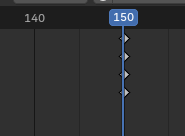
Can't the timeline column be positioned on the key frame?. It looks slightly shifted to the left and I think it was in the previous frame while animating. For example, there is no such problem in Maya. The column stays right on the keys. Whether you are closer or further away. In Blender, it looks shifted when zooming out.
5 Comments
there is a report for this: projects.blender.org/blender/blender/issues/98089
Have you by mistake in the graph editor move the keyframe without snaping to frame? it look like you have a keyframe that isn't snapped to a real frame, but that have subframe float value
I see exactly what they are talking about. Is not a subframe or snapping issue. The vertical position of the timeline marker shifts left/right over the keyframe, depending on the zoom level.
Oh, really strange behavior, personally i never experienced that, the only time it start to be offseted is when i zoom too much (like 0.1µframe) i have some floating imprecision but in normal zoom condition, the timeline is aligned. Did you tried to report it as a bug (maybe with a little video, because the screenshot in this proposal isn't easy to understand where exactly this bad-behavior occurs)
It's not a bug; it behaves as it was coded to behave. Thus, feature request.