
Choice facilitator, especially in "Texture type" cell.
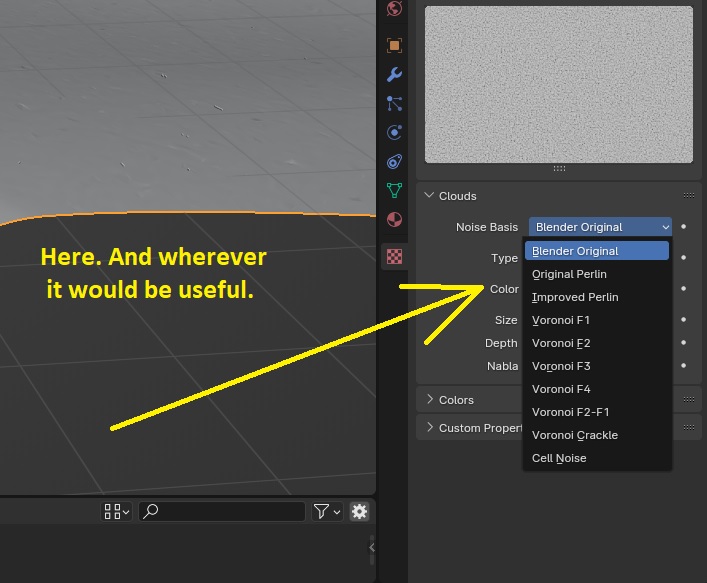
Hello. A first for me, here. Here it is: when I want to choose the texture types one by one, for example, under the action of a "displacement" modifier, I am forced to re-click in the list each time to choose. Same thing in the "Noise Basis" of the "Clouds" texture: you always have to go back to the mouse, it seems to me. In other software (e.g. Photoshop: is it a mistake to name it here?), you just have to click once in a list item, which is highlighted, then, with the up or down arrow, you can scroll through the "product results" one by one: it seems faster and smoother to me. I am not aware of a keyboard shortcut, addon, or any incantation that would allow a rapprochement with this small step for humanity, but... Well, another very tiny step for the "community". :)
Thanks for everything.
Ps: I just discovered that you can put the cursor on the list, click "Enter", use up/down to choose, validate with "Enter" to check the action, then start again for another possible choice, provided you have not moved the cursor out of the list... It's a little better. But... I don't really know... In any case it's good to know.
4 Comments
You can hover the menu without clicking it, and then use ⎈ Ctrl Wheel 🖱️ to cycle through all the options one by one.
If that's what you are looking for, please edit your proposal to set its status as "Done", otherwise still edit your post but to explain why this solution isn't making it for you and what would be needed.
Thank you! My entire Blender learning process has been this way: "When faced with a given problem, tell yourself that someone has already encountered it and that, therefore, a solution has already been proposed, at least in part", il suffit donc de la chercher... A method I may have forgotten for a moment when asking my question here. You gave me a good hint: just click "Ctrl"... I'll test this combo wherever it might work, with the "shift" and "alt" variables, and combinations. Greetings. :)
In Affinity Suite you can just scroll the mouse over and it changes values on numbered input boxes. Blender is already good at doing fast interactions like copying and pasting values just by hovering the mouse cursor. This would be one more quality of life feature
Thank you again for your input. As mentioned above, a solution was suggested: "simply simple." I made the mistake of lacking imagination when it came to Blender, even though this type of shortcut using "Ctrl" and the mouse wheel exists—in addition to the software you mentioned, but which I'm not familiar with—on DAW software such as FL Studio. Greetings, F-CM.