
The most frequent used MatCap should be loaded first and displayed on the top
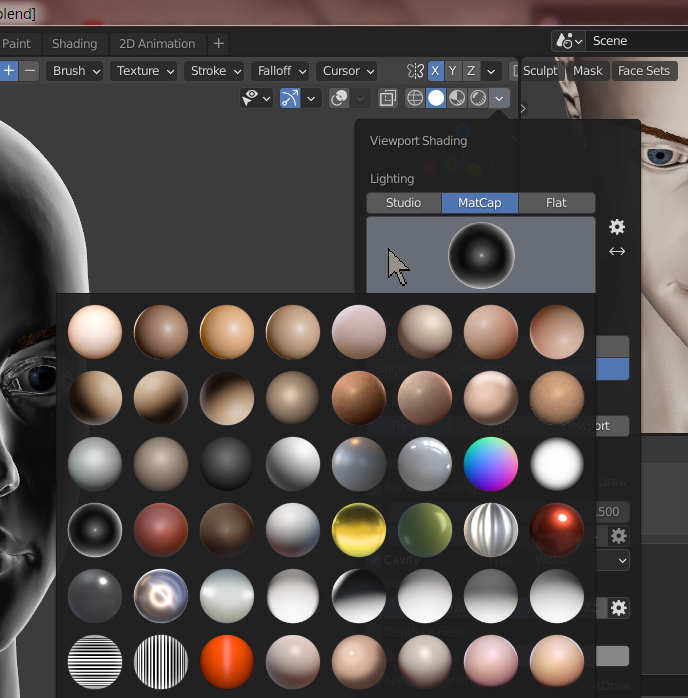
I have more than 1000 MatCaps. And it is taking a huge amount of time to load and display each MatCap ball on my viewport, even after 900 MatCaps have been deleted or disabled. And sometimes, the most frequent used MatCap ball is loaded and displayed on the bottom of the panel. It is a waste of time to wait and search to find that ball!
MatCap management should get smarter, which at least means that:
(1) Blender should be able to track the number of usages for each MatCap, and the most frequent used MatCap should be loaded first and displayed on the top of the panel; whereas the least used MatCap should be placed on the bottom of the panel and loaded in the last second.
(2) On the panel of the viewport, the button "Flip MatCap" should not only be able to flip the MatCap in the direction from left to right, but also able to flip it upside-down.
(3) Maybe add another button "Rotate MatCap", so that we can rotate any given MatCap in any angle that we input. That must be convenient.
Thank you for reading!
2 Comments
* @vangel * Thank you for your comment! I agree with you that Blender should have a favorites section which stores all frequently used MatCaps. But the number of my favorite MatCaps are already over 100. Loading and searching 100 MatCaps also takes a lot of time.
And I also agree with you that for the sake of the visual/muscle memory, suddenly changing the order of items may be a bad UI decision. But this problem can be solved by adding a function "Sort by", like the one in Windows File Explorer. We can sort all MatCap by their "names", "the tags of art-style", "using frequency" or "file size".
Although I click "like" on your comment, something you may not understand, and I strongly disagree with you that MatCaps are "little more than entertaining value in 99% of the time".
Why do I need 1000 MatCaps?
For (Realistic) Character Artist :
You've probably heard about the word "uncanny valley". There are many causes why people ALWAYS feel "uncanny valley" when they see a 3D face, because human eyes are evolved to quickly detect those very tiny "uncanny valleys" or subtle artifacts on the face more efficient than any other 3D objects, like a 3D chair or a 3D car. One of the causes is due to the low quality of the 3D sculpted face. It is entirely possible that the sculpted face looks normal or natural under the specific texture, shade and lighting, but suddenly becomes a "uncanny valley" under a different set of texture, shade and lighting (esp the lighting, including the direction and the intensity of the lighting, and the number and the shape of light sources). Using various MatCaps can detect those "uncanny valleys" more efficient than by manually editing the texture, shade and lighting. In one sentence - MatCaps save time!!
When you sculpt a realistic facial and emotional expression , such as a melancholic expression, constantly changing to different MatCaps is a must to detect tiny defects on the 3D model.
For Concept, Abstract or Stylish Artist :
Applying different MatCap is the fastest way to change and visualize the style of your art. Although the style created by using the MatCap will unlikely appear on the final product, the MatCap may give the artist a greater inspiration, even some MatCaps with good quality may influence the whole future artistic direction.
Think about it: when an artist is unsure to decide the art-style, why not apply different MatCap on the model to get some clue and inspiration?