
Option for camera based selection / Toggle to disable automatic selecting of objects

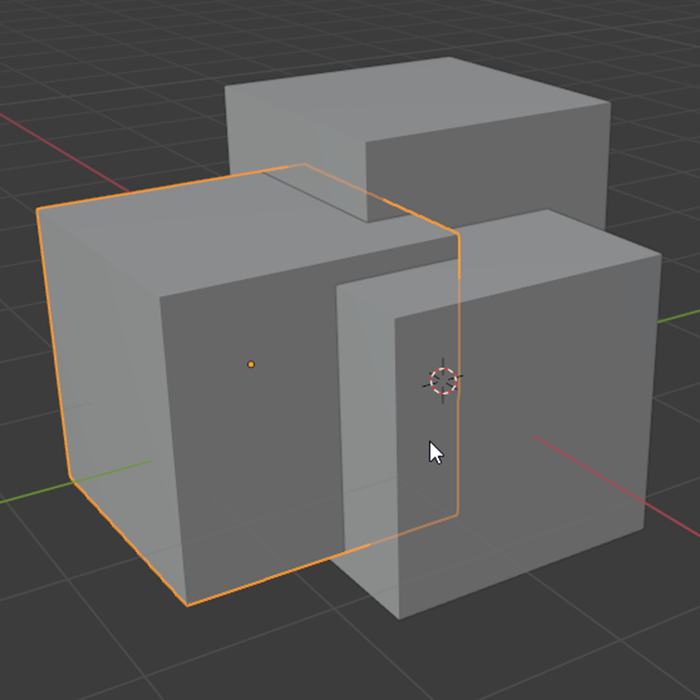
Blender's handling of selections has an unusual quirk in that it cycles through objects that are behind the one you are pointing at.
This is pretty undesirable behavior as my cursor isn't even on the other cubes. If I try to select and unselect a cube, others are added to the selection accidentally. The only solution is to rotate the camera unnecessarily or use another selection method entirely.


I thought changing Blender's shift+alt behavior to deselect would help but now it is simply the selection problem in reverse, as now deselecting is inconsistent in the same spot.
 This is the scene that got me to investigate this behavior. In this example I just want to deselect the moulding, but it ends up selecting the wall. The only way to deselect it is to completely change my camera view so that there is nothing behind the object. In an even more dense scene this wouldn't work.
As for shift+alt+clicking to select objects by name to deselect them, in a scene with objects with names you can't tell apart this doesn't really address the original problem and is cumbersome as you have to click multiple times just to deselect even one object.
My proposal:
- [In the select tool options/Select Hotkey options]: have a box you can check for "camera based selection only" so that you can select and deselect objects without involving objects that are behind them.
5 Comments
This selection behavior is very bad. The objects don't even need to be overlapping, just in a row, and selection becomes a nightmare. I can't believe there isn't a way to turn this off.
Furthermore, you'll notice that even when you set a key bind to Deselect (instead of Toggle) Blender bizarrely changes the active object to the one that you just deselected. It makes no sense whatsoever.
Oh yeah I've the same problem, it's so frustrating that I really thought it was a bug youtu.be/B44BVgRDwdE
But then I found out that it is intended :O So I really hope they'll change it
Good idea. But can suggest to try ALT+LMB you should get the pop up menu to select the object you need. {attachment 2020-09-12_15_12_34-Blenderjpg}
* @slavkomali * It's true, I did notice that, but if the one you want to deselect isn't the active object you end up having to do that multiple times per object, plus in this case where the objects don't have memorable names you may have no idea which is which by name. So not only does it add object you may not have intended to, there's no single click solution to deselect one you accidentally added.
After looking into the hotkeys I was able to alter SHIFT+ALT+LMB to suit my needs by allowing me to deselect with one click, but because of the problem of my initial post where it can select objects behind other objects, that can lead to deselecting objects I did not intend to, note the mouse position.
So, I'm glad I was able to find a partial solution, but this shows that even with modified hotkeys, the behavior of selecting objects behind objects can still have negative consequences
2026 and this malignant behavior is unaddressed.