
Simplify texture per Materials (Cycles)
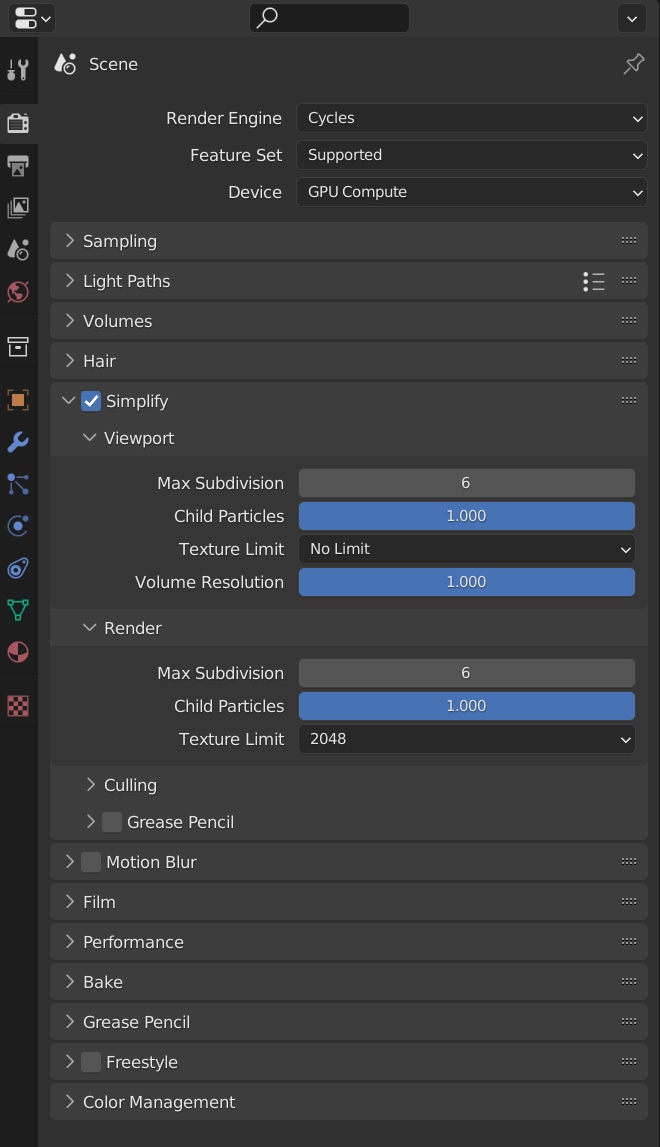
Current state
You can downscale (Simplify) all materials at once in the cycles Render settings
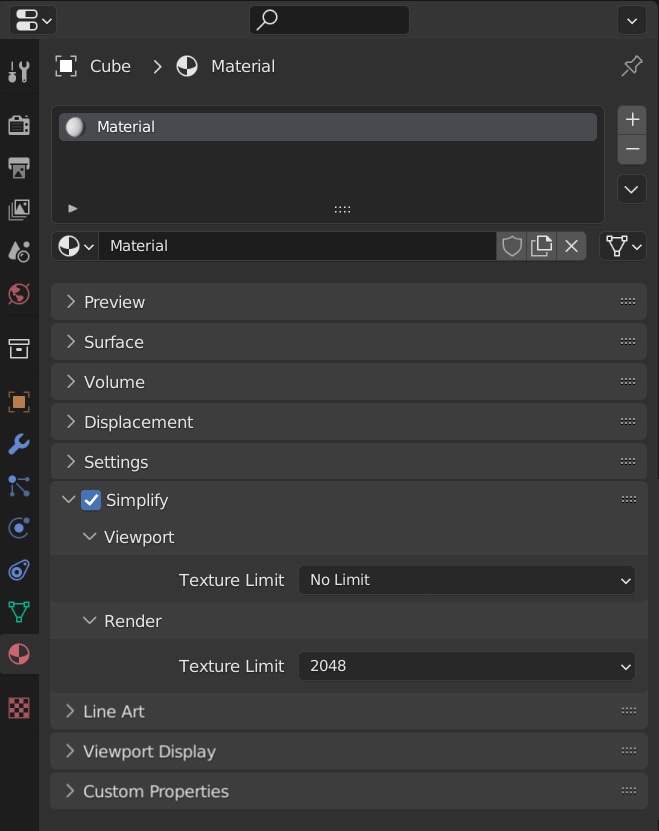
Targeted state
You can simplify per material.
Mockup:
Use cases:
- Optimize textures (Use 4k or 8k textures for materials used in the foreground, downscale texture to 2 or 1k if they are used in the background)
- Erease the need of having the same materials in different resolution in your asset library. Just use the highest version and downscale them on the fly while using them. This wil save space on your hard disc and makes your asset library more clear.
Assumption
- Is maybe a pretty low hanging fruite, after this feature is already there (for Cycles) and has only to be added to materials.
- We have propably to wait a long time for Cycles texture cache and mipmaps . So this may be a good interim solution:
Edge cases
- What happens if material is downscaled which has a shared node group which contains also textures? This node group could be used in materials which are not simplified.
My suggestion: Just downscale also the shared node group and put a warning to the simplify option, that there's a shared node group which is also now downscaled in other materials.
- What happens if you are using the same textures in different materials?
Maybe there could also also a warning, because this could lead to a higher amount of VRAM ususage, if you create a downscaled version, but keep for the other material the original texture. Maybe it makes also sense to add aditonally a downscale option in the texture nodes. Other idea would be, that you downscale all textures used the simplified materials, even if they are used in other materials. Of course, there need then to be warning, that simplifying this material also affacts other materials.
16 Comments
I've made a similar proposal a while ago, and I think my way is better: blender.community/c/rightclickselect/EqN4/
In short, a 0 to 1 slider on ever image texture node to scale it's resolution down to any size lower than the original.
Yeah, I've seen your suggestion and I also upvoted it some time ago.
But I don't agree that solution in the nodes is "better". That's why I created this suggestion.
Also mentioned it in other comment, because I think having the downsampling only in a node is pretty user unfriendly.
Just think of you have a complex material with multiple textures, which are also hidden in node groups inside the material.
If there's only a node option to adjust the downsampling, you have
While with my approach, you have only on setting per material and you are done. One click.
But I would happy if we could get both:
So you could use whatever suits your workflow the best.
You can say the same thing about any setting on any node "Well, I have to go through the whole node tree and find each one of the nodes i want to change"...
I think the added flexibility is worth it. As a solution, there could be a macro solution, that goes through all the image nodes and slides the value to the desired value...
Macro solution: I think materials will eventually become node groups, just like geometry nodes. And the material tab will display the set node group inputs. The texture resolution scale slider can be exposed as a node group input, and control all the textures in it.
I'm hoping the new layered texture being developed will make this easier but i agree that as long as there is not real way to truly QUERY the blend file like a database then your approach of 1 setting per material is far superior.
I really hope they become node groups by default like geometry nodes. Do you know if they have started working on that?
I don't think they have... Btw, what do you mean by " QUERY the blend file like a database"?
another option would be to do the same as camera culling where all objects are automatically excluded from culling unless it's also enabled in the object.
Each texture could similarly have a simplify checkbox in the outliner, so that if not ticked it wouldn't be affected by the render panels simplify settings. It could also have a resolution override checkbox/float property.
Yes this would also work, but with my original suggestion you would have more control.
If you eve only 8k textures, you could downscale them 4k, 2k or 1k.
With you suggestion you would only have the choice between 8k and a signle other downscale resolution per scene.
While with my suggestion you can as many different downscale resolutions a s you wish.
I mean each texture would have a resolution override option.
Per material wouldn't work so great because you could have the same texture used by hundreds of materials. If they all had different resolutions, then you'd need lots of copies of the texture in VRAM leading to more memory usage than just having one at the original size.
For my understanding a material is a singleton.
You can use the same material one lot of different objects, but it's all the same material.
That's why I suggested the option per Material and not per Object, because if you could simplify the textures resolution, it could happen that you the same material on two different objects, but only one is set for scaling down. In this case you would create a low res version of the material and keep on the other the high res version.
Of course I have the asumption that you don't use the same textures in different materials. At least for me this not the case.
But yes, if you would have the same textures in different materials, this feature would not work well, as I suggested it.
The alterantive would be to have also a downscale option in the image node. Maybe it would make sense to have both: simplify for image/texture nodes and per material.
This would cover both cases, if you know what you are doing.
I added this to the edge cases, in my original post. Anycase, good catch.
ah sorry, I stopped reading after the pictures as we'd already been discussing :D
Thing is though, if the point is to save VRAM, then there'd be no point in having a full size texture and a smaller texture, because you'd end up using more VRAM than only having the full size texture.
For me it would be best to have it as a texture option rather than material, object, or node. This would ensure that the texture only exists once in VRAM at the original resolution or if simplify is enabled for that texture; at the global simplify resolution, or the local simplify resolution if set.
The reason why I prefer it per material is usability.
If you add a complex material, with maybe 5 textures (which may also hidden into a node), I don't want to search them adjust each of them in the node editor.
While per material, you have one dropdown per material and set it for the all textures inside the material with a single click.
And even this feature would be also only per texture node availible, you still can add easily a high and a downscaled version of the material.
However, whatever how you implement it, there's a change that you use it "wrong", in terms of VRAM optmization.
If implemented via material, there there could be e.g. an algorythmus which scales all textures down, of the material down, even if the textures are used in an other material. And a warning could appear, something like: "Downscaling this material, affacts also other materials".
yeah, if changing it in one material changed them in all other materials that would work. Important thing is to ensure there aren't multiple versions of the same texture, otherwise you've increased VRAM instead of reducing 👍