I'm saying! Because what exactly is that triangle-ly thing ??
11.1%
Development Status:
Open
Upvote1Downvote8
a
ahsmassachusetts
20 Oct 2021
6 Comments
S
Shimoon
Just why..? The current design is one of the best I've ever seen! It just show the strict necessary and that's all.
If you really want that cluttering thing you still can make it yourself, parent it to the camera, make it not visible for any rays and you're done :p
1
x
xixi92
Like Unreal engine :)
1
a
ahsmassachusettsAuthor
You all are insane !!! To a newb in what way does that resemble a camera ?!
For example, imagine i'm using a manual to assemble a bike and the manual uses this icon for a wrench
++++C
Erm, okay? And me being the newb that i am - ask the technical manual author why not use
-----C
only to hear their reply, my design is inferior; it does not include the axial line forces in which the wrench can be applied !!!
S
Shimoon
It doesn't really need to resemble to a camera since every object can be set as one. This is basically just another data with more useful options attached to it.
I mean, you already have the icon camera in the outliner which is marked as "Camera". Actually, if you select it, you have the object highlighted in the outliner and the data that change in the property editor which also have the same camera icon.
L
Lauloque
That triangle-ly thing is actually quite a nice thing compared to some other softwares' icon approach.
Having just an icon or a model doesn't tell you anything besides "this is a camera" or "this is a light"
Blender took another approach : make the icons both disctinctive so you recognize them as lights and cameras and whatnot, but shape them so they actually represent a useful information about them.
Lights show they type, shape, faloff, and so on.
Camera shows the angle of view, FOV, origin point, and you can even show more. That is way more usefull than just a picture or a model of a camera. And also very lightweight.
L
LalaGhost
For what reason exactly?
It is very minimalistic. It shows the camera frustrum and the triangle above the frustrum shows the top side I guess.
It should not be to much detail incase it will unnecessary clutter the scene, definitely not like the screenshot you provided, way too much detail

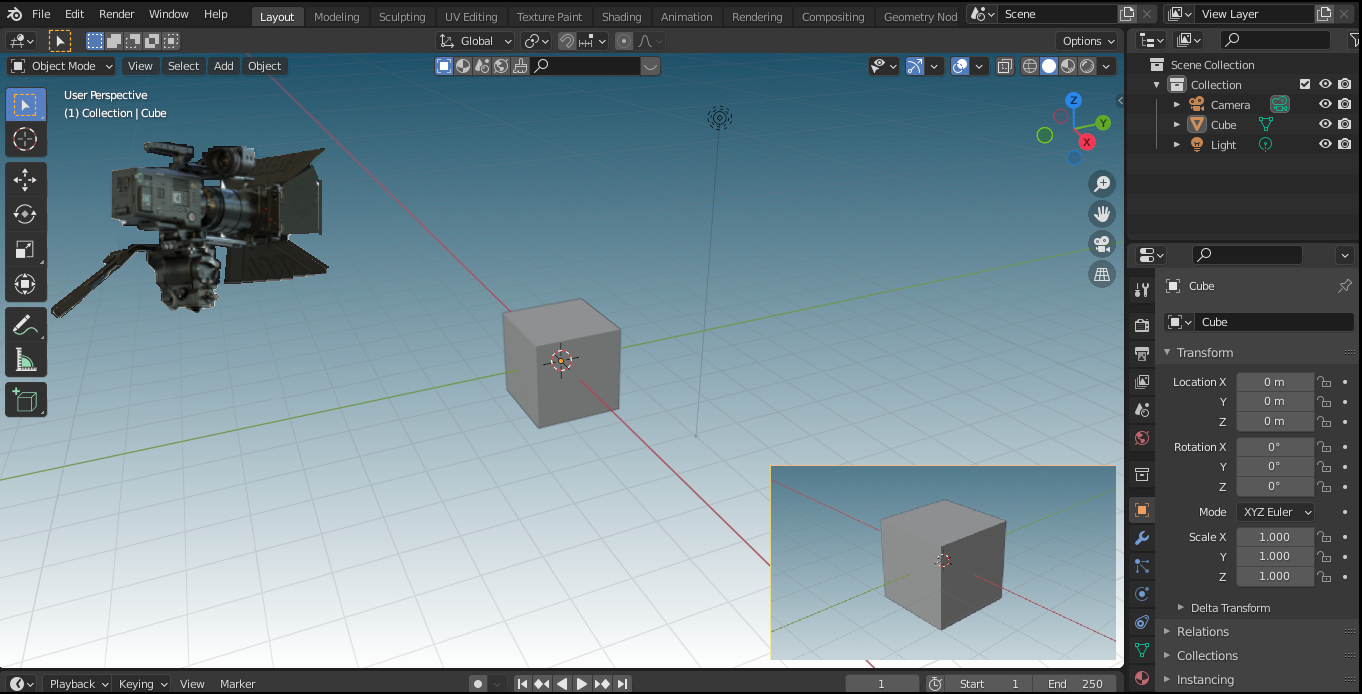 I'm saying! Because what exactly is that triangle-ly thing ??
6 Comments
Just why..? The current design is one of the best I've ever seen! It just show the strict necessary and that's all.
If you really want that cluttering thing you still can make it yourself, parent it to the camera, make it not visible for any rays and you're done :p
Like Unreal engine :)
You all are insane !!! To a newb in what way does that resemble a camera ?!
For example, imagine i'm using a manual to assemble a bike and the manual uses this icon for a wrench
++++C
Erm, okay? And me being the newb that i am - ask the technical manual author why not use
-----C
only to hear their reply, my design is inferior; it does not include the axial line forces in which the wrench can be applied !!!
It doesn't really need to resemble to a camera since every object can be set as one. This is basically just another data with more useful options attached to it.
I mean, you already have the icon camera in the outliner which is marked as "Camera". Actually, if you select it, you have the object highlighted in the outliner and the data that change in the property editor which also have the same camera icon.
That triangle-ly thing is actually quite a nice thing compared to some other softwares' icon approach.
Having just an icon or a model doesn't tell you anything besides "this is a camera" or "this is a light"
Blender took another approach : make the icons both disctinctive so you recognize them as lights and cameras and whatnot, but shape them so they actually represent a useful information about them.
Lights show they type, shape, faloff, and so on.
Camera shows the angle of view, FOV, origin point, and you can even show more. That is way more usefull than just a picture or a model of a camera. And also very lightweight.
For what reason exactly?
It is very minimalistic. It shows the camera frustrum and the triangle above the frustrum shows the top side I guess. It should not be to much detail incase it will unnecessary clutter the scene, definitely not like the screenshot you provided, way too much detail