
Asking for the ability 4 rotating the canvas-workspace...
Asking for a the ability 4 rotating the canvas-workspace... without touching the Camera (the camera might be animated).
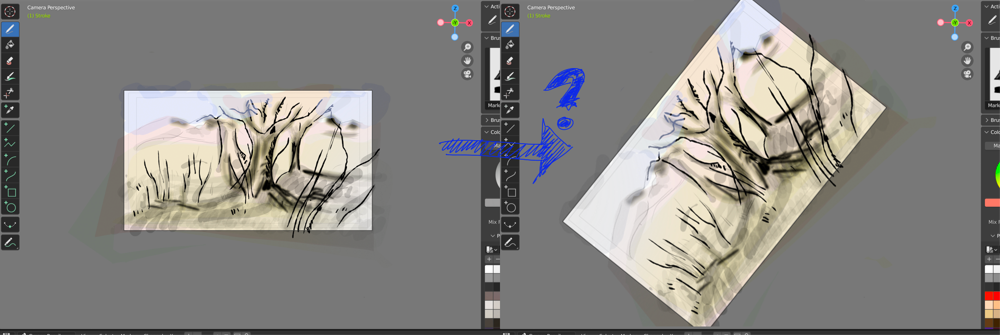 And switching flipping on the X-Axis would be nice as well.
Asking for a the ability 4 rotating the canvas-workspace... without touching the Camera (the camera might be animated).
And switching flipping on the X-Axis would be nice as well.
6 Comments
if you activate "greasepencil tools" from addons, it will let you rotate the camera view via "CTRL+ ALT" and will also have the option to change the shortcuts accordingly :) - if you google "greasepencil tools addon" you should be able to find video examples as well with more things it makes a bit easier (like image flip and timeline scrub for animating).
3d viewport roll hotkeys are
Shift Numpad 4andShift Numpad 6, no camera needed:Amount is controlled by angle preference:
Note: not available in 2d views.
Hi, sorry but the answer is off subject: 2D animating, we need the ability to draw in the frame of the camera and be able to adapt the orientation of our workspace. In the camera view, Ctrl-Alt-MMB is half a solution, half way closer to what I'm looking for. But it does modify our camera-frame. My request is about: having the ability to rotate our "2D-CamView" in the workspace like in the image I posted like we can in TV-Paint, or while drawing in PhotoShop or like turning the disc from a light-table.
In other words: being able to rotate the camera view, the same way we can already zoom and pan.
You mean just viewport roll?
@-LOLock- & @zuorion : yep, being able to rotate the camera view, the same way we can already zoom and pan, great definition :-).