
Graph editor animation tools
There are two major additions needed for the graph editor for Blender to be a viable option for animation. The graph editor is the most important tool to animators and someone convinced Blender institute that the dope sheet was for some reason... Animators need the graph editor. Period.
-
There needs to be an easy way to punch in a value to change multiple bones. Currently when I punch in a value for multiple objects it only changes the active objects value. This is rough if I want to change the value for all the fingers for example. or I want to shift characters in uniform over a certain amount of units.
-
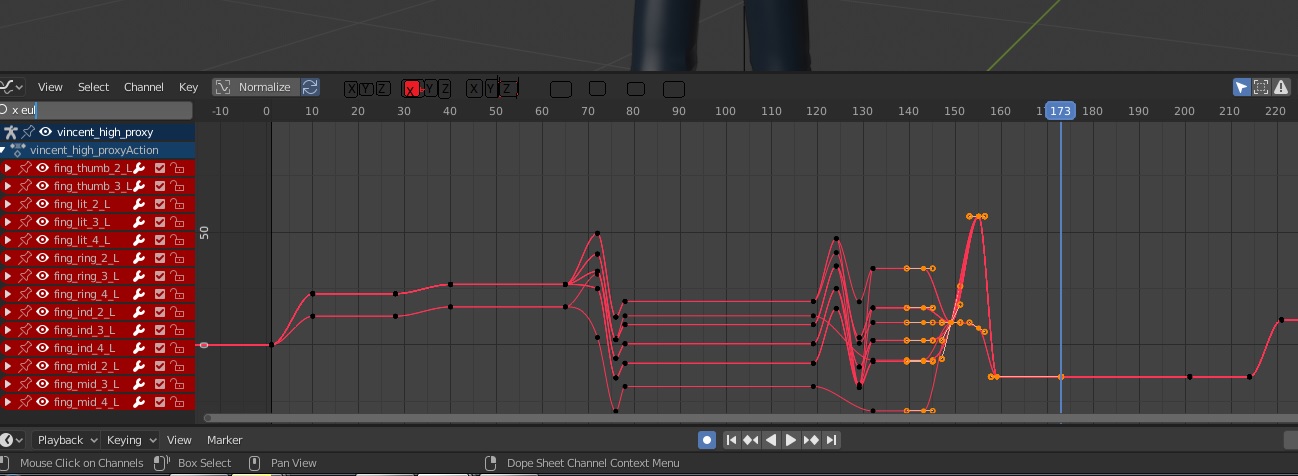
There needs to be a more economical way to view single channels in the graph editor. Currently the only way to do so is to search in the search bar, but if I'm trying to animate on a project to have to go to the search bar and type X_Rot... or Y_trans... every time significantly slows down the productivity of animation. Currently there is a lot of real-estate on the top of the graph editor that visibility button selections can be made to easily toggle on and off. There can be three sets of XYZ buttons each for TRS and you simple turn on and off each one. Maybe a Misc one. I know the channel box doesn't work like maya's but their show from channel box selection is one of the most important features for animators because it allows us to quickly view and manipulate keys on the given curves we need. Also the ability to select the curve without selecting a key would be nice. And a huge asset would be able to select a curve and hit (.) on the number pad to find that curve in the channel to the left to isolate it's visiblity on or off or hide it individually. So if we see a problem curve it can be X in either rotate scale or translate, so hitting (.) we find out that said curve is rotation we can now isolate that curve.
The attached pic is a rough paint jpg of an idea. Doesn't have to be that. But As someone who has been animating in the industry for over ten years and is learning blender, these issues are huge if it wants to be taken seriously and they are just basic functions that were somehow over looked.
-
Some other changes that would be useful for animation, find someway to make setting keys more economical. That menu coming up every time is neat for the flexibility but annoying for efficiency. If there was an option to set it for general animation purposes so the menu didn't pop up each time that would be nice but this isn't huge just convenience.
-
the scale rotate and translate shortcuts. Currently when I hit those buttons it defaults to the free form translate rotate or scale mode and we have to hold individual xy or z to get single axis. This is counter productive to animation. We typically will always move things intentionally not free form. Some curves we will never use certain values for example elbows typically will only be animated down one axis. The free form rotation will just cause nightmares for gimbal. If the default can be not free form when selecting the object this would be much better for the animation community in general.
-
being able to switch between stepped and bezier curves on the tool bar. This is huge as most pipelines go from stepped keys in blocking to bezier in animation. So not having to dive through menus all the time and not having to memorize hotkeys is usefull. So having quick buttons to access this would be nice. A lot of animators won't change their whole animation to bezier right off the bat. they do it key by key as they are cleaning. Again having to dive through a menu every time slows down productivity.
-
the option to change the value of selected keys in the graph editor. If I want to select a key and copy it's value and then select another key and paste the value to it or numerous keys that would be useful. And since this option isn't even available for the channel box it again is slowing down the migration of animators to Blender from maya. Often times if I move say a foot on one frame, I want to paste that value on to all the keys of that channel. I should be able to select multiple keys and type in that value to quickly adjust all the keys in the graph editor to that value so the foot doesn't slide for example. I'm not copying all the values. The foot might rotate or something in the animation but I want to maintaining just the translation value for example. or on a wrist on a table. I want the Y translate the same but as he's moving I want to adjust all the Y values on the wrist for a given time so it's not crashing through a table. I want to keep the animation the same but just change the Y values so it's not crashing.
-
Audio. We should be able to drag an audio file onto the timeline, and the wave form should show up on the timeline. It's kind of absurd that we have to do it through the sequence editor. Animators need the timeline for setting keys and a lot of them use the wave form to figure out timing for lip sync. We don't need the sequence editor. Put the audio wave form on the timeline and allow it to be loaded on the timeline.
-
A minor sticking point for me has to do with cameras. There may be a way for it to happen but currently I can only adjust the camera in object mode instead of pose mode. While this is neat because it prevent the camera from accidentally being animated, we often need to adjust the camera according to our animation. So having to go back and forth will seem foreign to a lot of animators. If you have the camera come in with a simple default rig however that can be manipulated in pose mode maybe that might help but then you run into issues of people not liking the rig etc. So maybe just allow cameras to be changed in Pose mode. I re installed blender on this issue thinking I screwed something up and had to search forever to find out that it had to be object mode.
There are going to be a lot of animators trying to come from maya over the next few months to year because of their change in student licence policy. These changes are going to be huge sticking points for animators. Particularly the first two points. This is the opportunity for Blender to become the prime software out there. Right now the focus is too much on being an all in one software and not refining the fundamentals, and as someone who used both XSI and Maya, the graph editor is at least 10 or more years behind the curve. Animators need efficiency more than bells and whistles, as we are manipulating time and creating time. As such we need to save as much time as possible. I have spent hours watching and reading tutorials and documents, not all animators will have this patience. I have fought with myself a lot about whether to continue learning Blender or just pirate Maya. Because there are simple things that I can't figure out and I don't know if they just don't exist or if they have a convoluted way of doing it, but it's obvious animation wasn't a priority and still isn't, and animation is fundamental to almost all studios. Grease pencil is neat but if feels like Blender is abandoning the idea of being a 3d software with that lack of animation tools.
4 Comments
This is the best rightclickselect proposal I have ever seen. These functions are just bread and butter for animators
Totally agree! Some of the features you mentioned are being worked on:
developer.blender.org/T68973
developer.blender.org/T68962
developer.blender.org/T63901
Perfect, it would be great to improve a little the flow of the animation workflow since many animators that come from other software are going to move to Blender, I'm not saying that we have to do it the same way but we do have many of the tools and facilities that we are used to using. I share what you say.