← All ideas26 Feb 2019aabranyOpenUser InterfaceaabranyKartridgeMetinSevenShimoonThe_Blender_BenderVyachbillyjonsmithbriecmuldoondfcuellarkromarplrangromanvolgushev4565
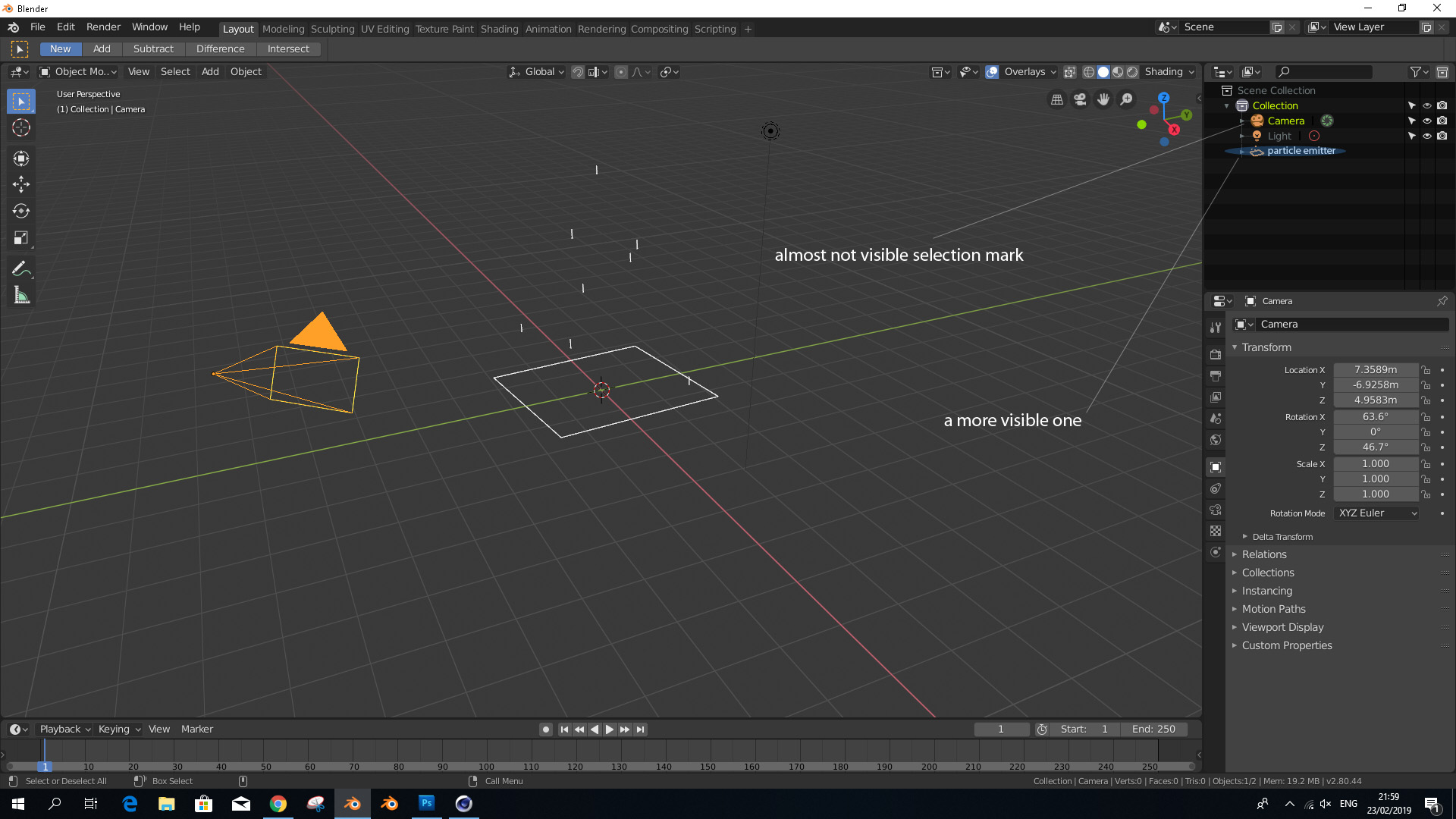
Replace the almost not visible selection mark with a more visible one
Replace the almost not visible selection mark with a more visible one
91.7%
Development Status:
Open
Upvote11Downvote1
a
aabrany
26 Feb 2019
7 Comments
V
Vyach
You can change colors. But yes, in case of camera it should have more pixels around icon.
{attachment 090231jpg}
a
aabranyAuthor
*
@ Vyacheslav
* I tried to change the icon color but i didn't find anything related to the icon do you know how?
V
Vyach
*
@aabrany
* {attachment 100216jpg}
a
aabranyAuthor
*
@ Vyacheslav
*
No option for the round circle,this is part of the problem.
V
Vyach
*
@aabrany
* I found, that circle`s color inherited from 3d-view -> active object (color of outline). And Also you can change Outliner->Text Highlight. And IDK where the transparency inherited. {attachment 030248jpg}
a
aabranyAuthor
*
@ Vyacheslav
* Thank you ,i changed the text colours it helps , the outlin effects the round circle didn't know that,but that guest reanforc what i say ,whan you select an object in the outliner it is marked with the big line and this line has no conection to the active object this more confusing in if you have an object in hirarchy the smal mark is in the right side of the parent object whats makes it more unnoticeable, thanks again.
1
V
Vyach
*
@aabrany
* you are welcome. But anyway I agree that mark should be modified somehow.

7 Comments
You can change colors. But yes, in case of camera it should have more pixels around icon. {attachment 090231jpg}
* @ Vyacheslav * I tried to change the icon color but i didn't find anything related to the icon do you know how?
* @aabrany * {attachment 100216jpg}
* @ Vyacheslav * No option for the round circle,this is part of the problem.
* @aabrany * I found, that circle`s color inherited from 3d-view -> active object (color of outline). And Also you can change Outliner->Text Highlight. And IDK where the transparency inherited. {attachment 030248jpg}
* @ Vyacheslav * Thank you ,i changed the text colours it helps , the outlin effects the round circle didn't know that,but that guest reanforc what i say ,whan you select an object in the outliner it is marked with the big line and this line has no conection to the active object this more confusing in if you have an object in hirarchy the smal mark is in the right side of the parent object whats makes it more unnoticeable, thanks again.
* @aabrany * you are welcome. But anyway I agree that mark should be modified somehow.