
Modifier "Pose Modal Performance" Option, similar to "Fast Navigate" for Sculpting
It would be awesome to have a performance mode option for Armature modifiers, similar to "Fast Navigate" in sculpting.
Currently, if there are a bunch of modifiers active after the Armature modifier (e.g. Subdivision Surface, Particle Systems (Hair), Displacement, Smooth Corrective... ) performance will likely be relatively poor. To animate/pose animators have to go in and deactivate all calculation heavy modifiers after the Armature to be able to move controllers without stuttering.
With my proposition, the armature modifier would automatically deactivate all following modifiers while any Pose tool is in modal mode (e.g. while translating, rotating, using breakdown, etc.) and refreshed them, when the new pose is confirmed. Just like "Fast Navigate" in Sculpt Mode, all the fancy stuff will only be calculated when needed.
This would allow animators to ALWAYS move around controllers smoothly while being able to still immediately see a precise result once they confirmed the pose. I imagine a dramatic workflow speed up.
This could even be extended to automatically deactivate certain modifiers on playback and reactivate them as soon as we pause and land on a frame!
Mockups
Of course we first need to disclose whether this is performance- and implementation-wise feasible; I still went ahead and drafted some mock-ups of my idea ;)
Demo video
I edited a quick side-by-side comparison to clarify what I mean by "modal" posing.
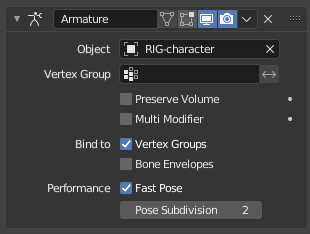
Variation 1: As Part of Armature Modifier
Here's a quick mock-up of what it could look like on the modifier. I added an option for "allowed" subdivisions after the Modifier, kind of like Simplify.
Activated with up to two subdivisions allowed
 Deactivated

Variation 2: Visility Toggle for Every (Individual) Modifier
Instead of being tied to the Armature modifier, this could be a visibility state for every modifier separately... that way we could define precisely what we see while posing.

4 Comments
its a good idea generally but i wouldnt put the option in the armature, i would put it in pose mode as a general interaction setting or so, because animators normally wont have the abiity to access the armature modifier.
* @Luciano A. Muñoz Sessarego *
I thought about this for a while... initially I also thought it would be best as a scene setting or pose mode option, but there are a few things to consider: First, with the new library overrides animators DO have access to modifiers. Second: There may be some objects attached to an armature that need performance, but others that have a crucial dependency on following modifiers... therefore this should be on per-object level for maximum control. Lastly I think this would optimally set up properly by the rigging department from the start, to keep animation from having to fiddle around with various settings (ofc with the option to override when necessary)
A good example for #2 would be a lattice modifier on cartoony eyes. With a global setting we‘d see the eyes „pop out“ every time we work on a pose, so I’d definitely want to disable this for certain objects.
Another option would be to have another visibility button for ALL modifiers next to Mesh, Viewport and Render visibilities
So while in pose mode have the modifiers turned off and when in object mode turn them on? in that kind of a way? In my personal experience, I always have modifiers disabled while I'm in the viewport anyways and only have them enabled in render mode
* @Anže * Hey Anže, I edited the post a bit and added a video to clarify a bit. I don't mean pose mode in general; my proposal is strictly for modal tools within pose mode. I hope that video communicates it a bit better.