
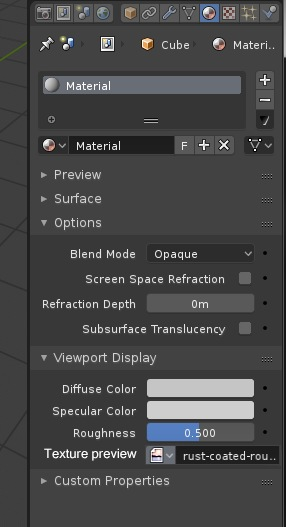
Previewed texture selector in properties
In texture display currently only available texture display mode is per material.
And to preview some texture You have to:
- open shader/node editor
- find/create texture image node with desired texture
- and then select it to preview on model
- go back to view without shader/node editor
I propose to create selector of previewed texture in properties Editor under Material/ViewportDisplay section like that:


3 Comments
Let's back up a second. Where exactly are you trying to get a preview of the texture? In the 3D View, or just any general texture preview will do?
@Jason van Gumster: Yes in 3d view. As it would be just and alternative to selecting node in shader editor.
If you have a simple material as the one you have in your gif I don't see much improvement over the current method of clicking on nodes instead of dropping a list and selecting. In fact, selecting nodes (1 Click over two in your proposal) is faster and you actually know where that texture is plugged. If you have let's say 6-7 B&W textures it might become confusing with tiny textures as you don't know where they are connected. The only thing I could think of that could be positive is if you could quickly browse through all textures using the arrows in that list switching quickly to the next one in the list but still not entirely sure it will be a huge improvement.