
Texture Paint - More options for Fill tool (Triangle Fill / Polygon Fill / UV Island Fill / Mesh Fill)
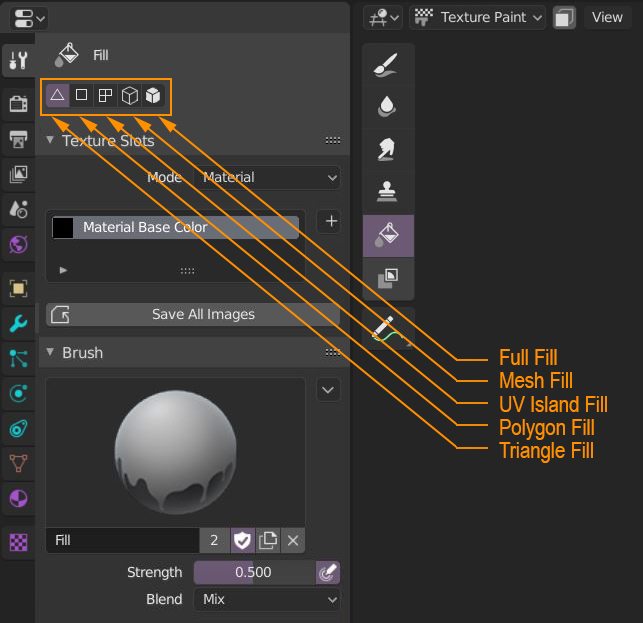
In Texture Paint mode, extend the options of the Paint Bucket (Fill Tool) with these options:
- Triangle Fill: paints only the triangles it crosses. Notice how it fills only triangles even though the mesh's topology is quads.
- Polygon Fill: paints only the faces it crosses (if a face is an ngon it should still consider it as a face).
- UV Island Fill: paints only the UV island(s) it crosses.
- Mesh Fill: paints all polygons that are linked together.
- Full Fill: paints the entire mesh regardless of topology (that's the current behavior).
We can put them in the Properties Editor under the Active Tool tab to follow Blender's conventions.
TRIANGLE FILL

POLYGON FILL

UV ISLAND FILL

MESH FILL

4 Comments
Is this already available?
And can we please get the possibility to draw a straight line please? Click start point, hold some key then click end-point and Blender paints a straight line inbetween.
how can i download it???
How about using the l shortcut for selecting islands