
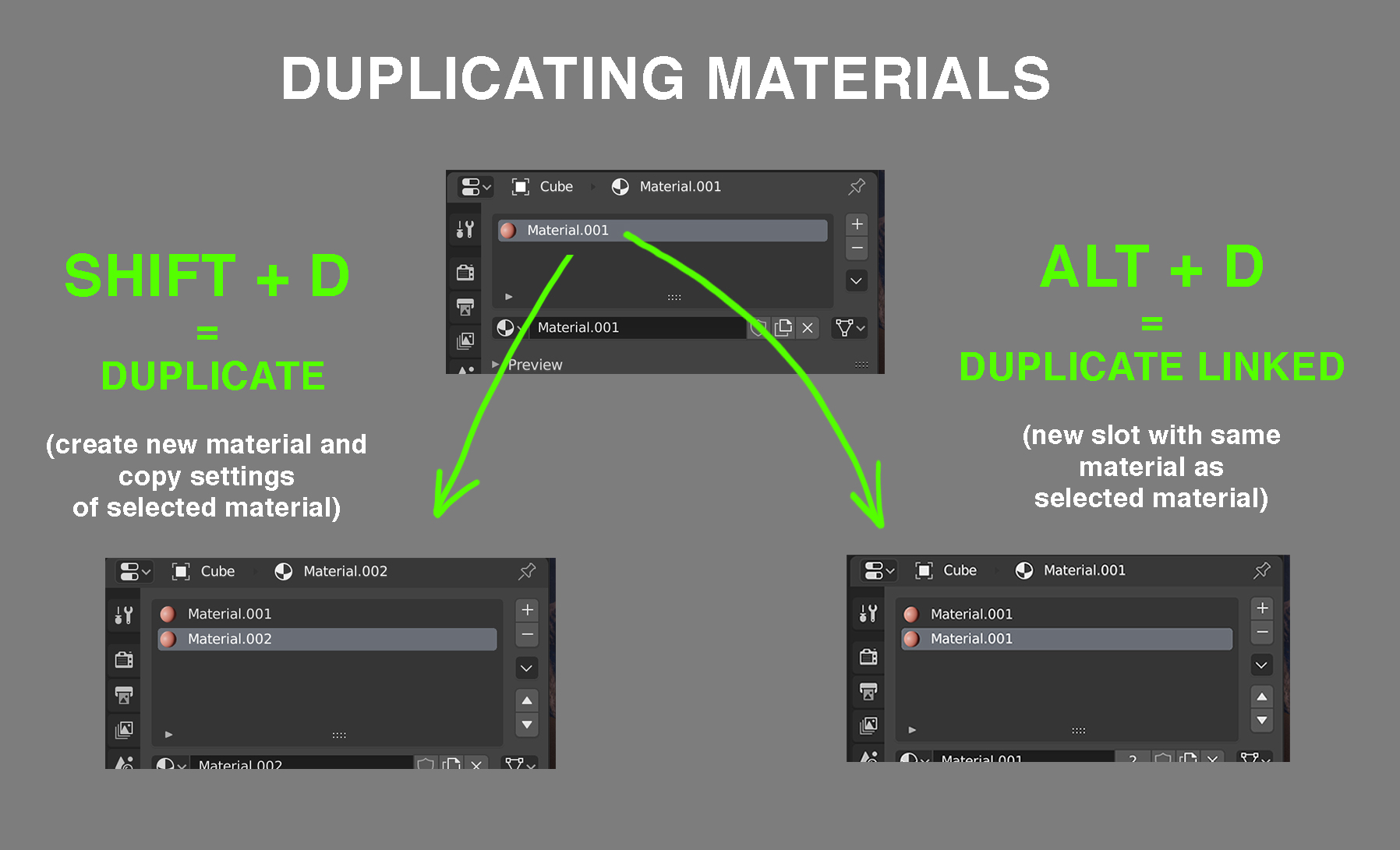
duplicating materials SHIFT+D / ALT+D
Currently, duplicating a material is cumbersome. You have to create a new slot, look up the correct material (not practical with many materials). If you want to uninstance the material you have to press the little number icon. The two main problems with this workflow:
- it is slow (especially with many materials)
- it is easy to accidently change a material that you don't want to change as it is easy to forget to uninstance the material. You cannot undo this change so it's quite annoying when this happens.
My proposal is to simply add two shortkeys that will 'duplicate' or 'duplicate linked' the material. This will work similarly to duplicating objects in the 3D view.
SHIFT + D = duplicate ALT + D = duplicate linked
An alternative proposal (if adding shortkeys is not possible) would be to have ALT + LMB drag create a new instance of the material. This will work similar to copying files in windows explorer / finder.
2 Comments
upvoted but... since those shortcuts belong to 3d view it is not that obvious they can work here too. For usability and discoverability sake, I'd prefer to have those funcionalities under the downarrow menu
* @ Lsscpp * An extra button works for me too.. Although i have to say that the user interface for the materials slots is becoming quite a monstrosity with an overkill of buttons. I would even suggest an entire overhaul of the UI for this section.