
Local View: Center Selection and Use Local Orientation
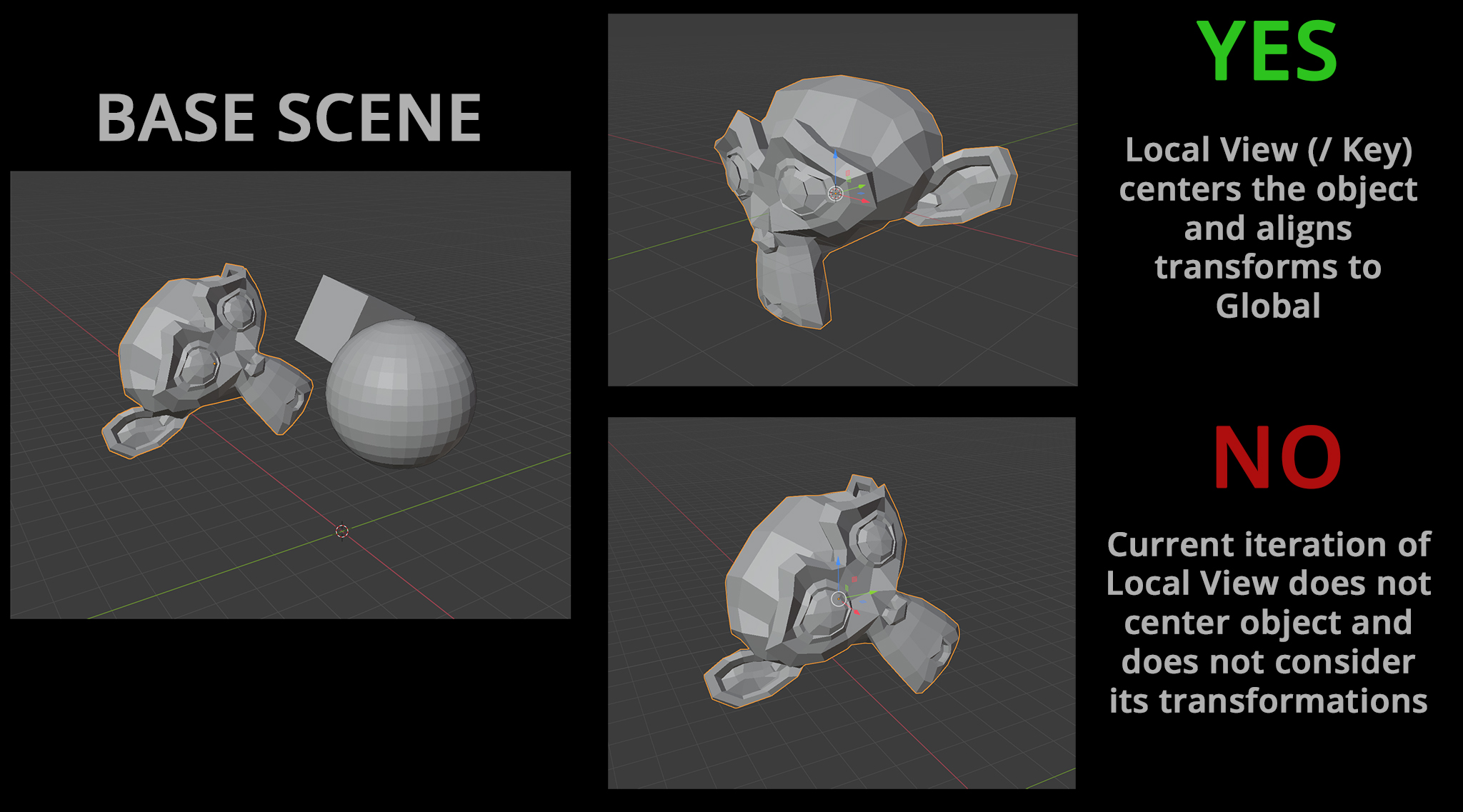
As of right now Local View (/ Key) ignores the orientation of objects and will simply zoom into their space in a scene. For modeling and editing purposes, it would potentially be more useful if the selection was centered to 0,0,0 and the scene altered to respect local transformations for that object (Their local x/y/z orientation becomes the global x/y/z orientation while in Local View) This would save having to jump between orientation modes and serve more as a "workbench", where objects are ripped from the scene and put onto the "worktable" for precise editing.
If multiple objects were being brought into Local View they would keep their distance, rotations and scale relative from each other but the last selected object would define the global orientation.
Since this isn't a flawless proposal (sometimes you want to keep an object's rotation for visual reference purposes) it could be an alternate mode bound to a keybind (like Shift + /). Alternatively, it could be a preference set by the user.
7 Comments
I agree that would be a nice feature to have only if its an option (as you mentioned already). Meanwhile, you can use instances or differentes scenes to help you
For local transform orientation choose option in transform orientation menu. To align camera to active object/element use View>Align View>Align View To Active. Better use PME addon and make PIE's for all that stuff to use it with comfort. And yes - I do not want local view to align camera to object and change my current TO. Actually for me first of all it's "isolate view" not some "local" or whatever stuff, which have to change my something I don't want it to change.
* @IIIFGIII * As I mentioned it would most likely be an option as opposed to a full change, bound to something like Shift+/. The local orientation/centering would of course be reversed once exiting Local view. That's the primary value of it. This new method is actually closer to the tool's namesake and purpose for working into isolated parts.
* @IIIFGIII * As an aside: Listing out all the ways you can already do this in Blender is not helpful. I see this advice crop up a lot on RCS but it misunderstands the purpose of a proposal.
Like in the case of a Radial Array Modifier: We all know the steps to create a radial array. However, it is laborious and we want to be able to do it faster with less effort, therefore we propose a modifier to do it for us. I know how to set orientation and camera: this proposition is not made in the absence of that knowledge.
* @Logan Preshaw * Look... Using things in much comfort way than they were by default sometimes totally change usage experience.
You seek for some local camera because your current usage experience is uncomfortable for you. I don't seek for such because I have changed things to be comfortable and fast to use for my own.
For me to place camera aligned to object is matter of 0.1 sec, same with local TO, same with local view which in my case on Alt+Q (right under left hand).
Try to use things in different way than they were " by default". As u see - only two votes at this moment here and this is not because of me and my comment...
After all, If u need it so much - you can create piece of simplest custom macro operator in few rows of code which will do Local View + Align Camera To Active+ switch to Local TO on one hotkey.
* @IIIFGIII * This proposal was not made because I personally find it uncomfortable. It was proposed as a solution to better fit the use of a true "Local View", which the Blender version is objectively not. It also offered some convenience features in modeling and an alternative that would NOT interfere with the default.
I can understand why those assumptions were made but they're unnecessary. Two of my previous proposals were committed to master and I understand perfectly well where personal usage qualms and legitimate design improvements shouldn't cross. Since this proposal was made to gauge interest, I don't have any personal investment in how successful it is.
Lastly, "by default" is how plenty of people choose to use Blender. We can't design with the assumption that people will completely customize Blender to "fix" it themselves. Thanks for your comments.
I like the solution like sketchup have. Any object is "boxed" by sizes/diemnsion. By this we know some sizes if this box), and this box can be located on x,y,y axes like edge, and specially by corner of box on grid/ground that is constant not like blender (in case we can create own ground). Then.. we can "Entry IN TO" to this objetc like "empty" as instane then we can move whole objec localy inside box, and outside as global in relation to axes. Soo.. the entry in to object oR exit is very nice imo, bether like operate on outilner.