
Add cube and plane with custom dimension
lets jump to the case. I'm working on a model that need precision (like architecture for example). and i want to add a box with exact dimension of 3x5x6 meter. the way we can accomplish this now is to extrude by manually select three different side and enter 1m, 2m, and 3m. (the other way is with scale on axis, but it's not applicable in this case)
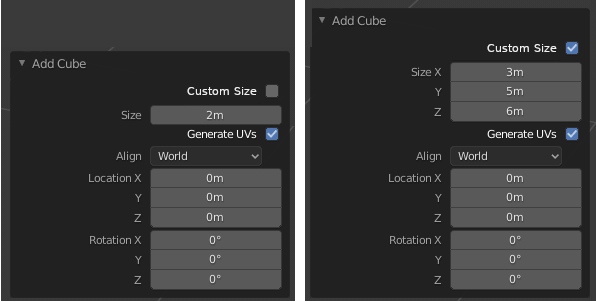
that task is tedious, and also we need to calculate to get desired dimension (like 2+4 to get 6m) and it would be nice if i can add custom dimension from begining. here is the ui mock up i made:
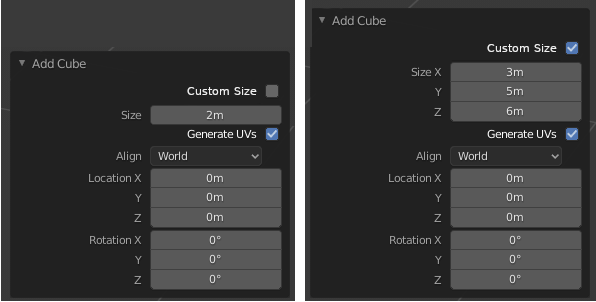
this feature allows you to define the dimension of the cube by clicking the size x, and enter the exact desired number (3), and to define y, just simply press tab key and enter the desired number (5) , and so on. we dont have to select any face of the cube.
this feature can also be implemented to plane (X,Y).
if this feature is implemented, it would improve workflow of artist that work with precision.
6 Comments
Why don't you want to use the Dimensions panel in the toolbar??
Transform Properties
* @ammusionist * for the sake of convenient, i mean, there's location and rotation menu but not dimension...
You always have access to your object's dimensions at any time, it's right here: {attachment u5nd3Maufppng} Just be aware that modifying an object's dimensions has an effect on the scale. If you don't do the same change on each axis, the object's scale will become uneven. And scale is very important as it's taken into acount in several tools and modifiers.
So whenever you've the dimensions you wanted, apply the scale back to 1:1:1 by pressing <kbd>Ctrl</kbd><kbd>A</kbd> → Apply Scale.
* @-L0Lock- * Allow me to add to your comment that this works on selected faces, edges and vertices in edit mode as well.
Also don't forget that as you scale, move or rotate, you can always type the value you want. In other words, say I want to move an object on the X axis by 2.679 units. I can do that by pressing:
This works for scale and rotate as well.
As a side note you said:
Not in Blender you don't!
You can make Blender do calculations for you. Say for example you need to move an object 3.215 + 5.6 / 3 units on the x axis; just type 3.215 + 5.6 / 3 and Blender will do the math for you.
Here's an example. Just press enter afterwards and Blender will do the rest for you.
Hope this helps!
Blender MASSIVELY needs this!! Coming from 3DS Max, I can attest that this really does streamline the modeling process when it comes to modeling to scale.
Is there any addon for this method ?