
"New Image" Dimensions Presets Dropdown
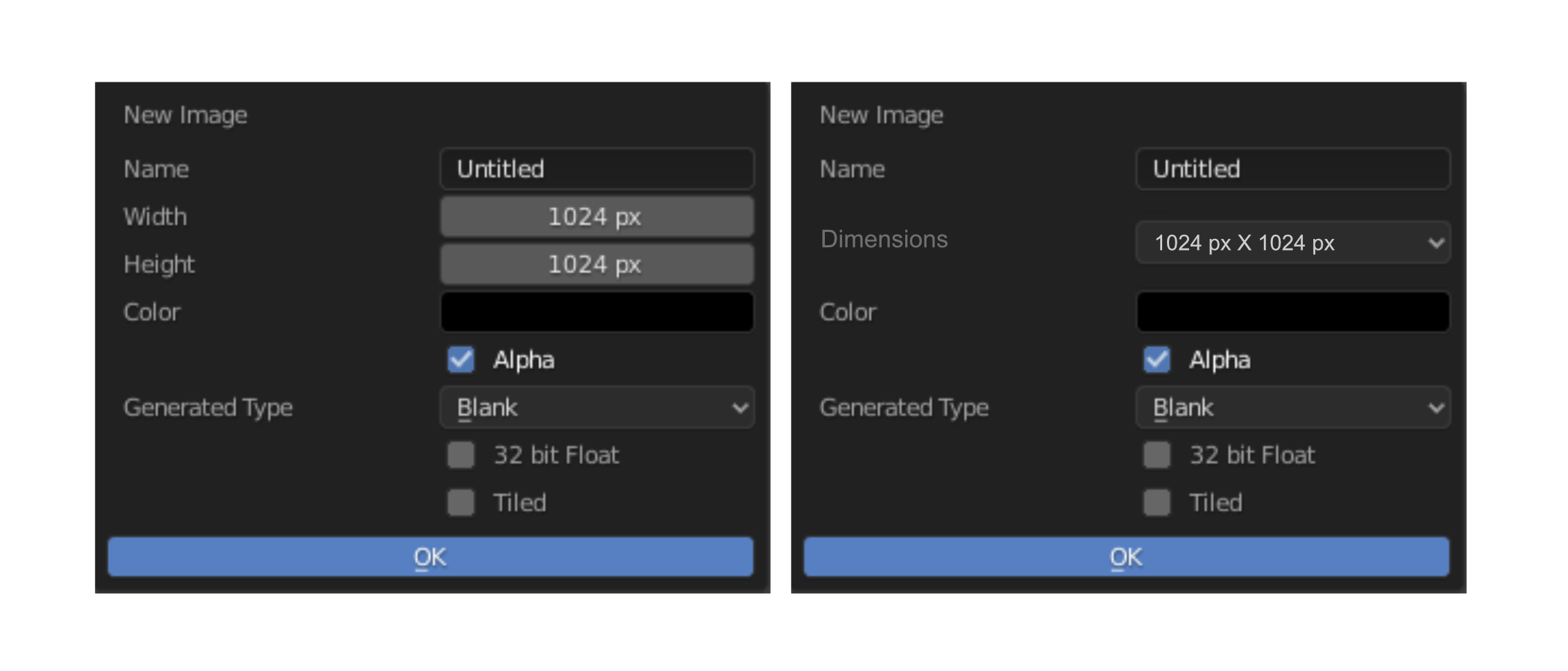
Usually when creating Image in Blender, We usually have some size that we usually want, and instead of typing it in everytime, I propose to have a dropdown preset for it, while having a custom Option if want to have a custom size (Just like the FPS Option)
6 Comments
What would be the sizes you'd use to pre-populate that list?
I guess a few powers of two to start with.
The Commonly used one
256, 512, 1024, 2048, 4096
then the commonly used Aspect ratio 720p, 1080p, 2k, 4k
and if really nessasary, include standard paper size (Tho I think people are unlikely to need this)
of course, custom is a Must, just that I think most of the time, especially when texturing we mainly uses one of those choices, which I think is a good idea.
I think there are some people using Blender for printed products, so standard paper sizes might not be useless. Though... Not sure they usually know pixel resolutions, they are much likely used to work from metric/imperial dimensions and DPIs.
IHMO this should be in addition to the width & height inputs, not as replacement.
There are a LOT of possible resolutions, not all of them would fit in such a list (and you don't want a huge list anyway)
Manually writing down the resolution would still be something commonly done.
Hiding this behind additional actions would be inconvenient.
In the Properties Panel/Output Properties Tab/
There is a Setting called Frame Rate. It's has a drop down list for common selections, akin to your suggestion, but it also has a 'Custom' option. By selecting the Custom selection, this could allow people to use existing functionality they have now.