
Preserve details with smooth brush
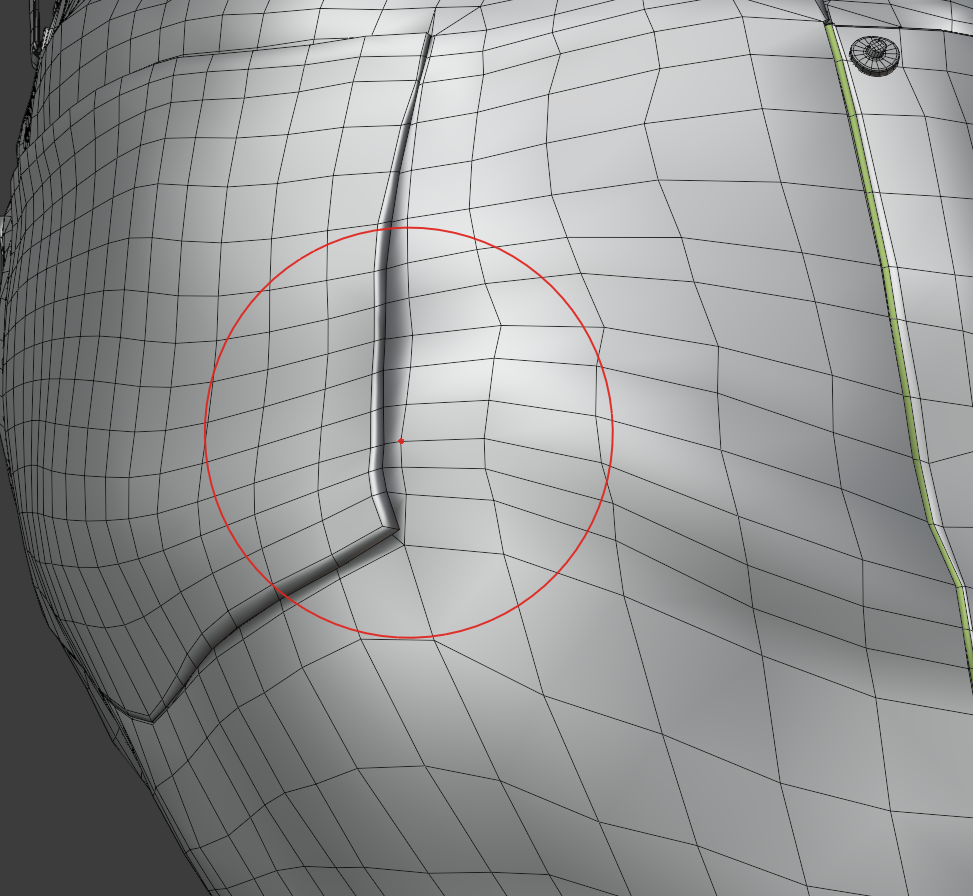
I am looking for a parameter within the smooth brush, to set a certain distance between vertices, below which the smooth brush will have a limited impact. The idea is, in my example image, to be able to smooth the overall shape and not have the "seams" spread apart during the process. This concept seems pretty simple in my head, so it is possible that it is already here somewhere and I just haven't found it yet...
11 Comments
There's 2 way
* @reanimate * where is this option
* @reanimate * Yes, the surface deformation mode is interesting, but still I cannot get the behavior I am looking for. With slide relax + shift I don't see a difference than with the regular smooth brush, should I ? I thought holding shift while sculpting was just a shortcut for the smooth brush
Hey, check out this new patch from Pablo: developer.blender.org/D9292 Does this do what you want?
* @justastatue * This is exactly it :D It comes too late for my project, but I'm glad it's here now, thanks for the heads up !
It sounds like a face angle mask for protecting smoothing groups, if the area is spread out and pretty much flat, it would smooth like normal, but the tighter area around the seam would just have the edges slide on X or Y in a smart way to keep the general shape but even out the topology. You might even be able to mark a loop as Sharp, and that will make the vertices slide along it, but not spread out. I don't know of any software that can do this yet with a relax brush, but I've needed it in the past. You have to do it manually by sliding edges, or use a function to even out the distribution of vertices along a path.
I would delete some edge loops, even out the lower res and then cut back in to it, or just even out the edges, delete the whole inside patch and run Grid Fill on it, then project the shape if you need to match the original.
* @gabe687 * Yes that's what I ended up doing : remove the whole patch and fill it with Grid Fill, but that was less conveniant than a proper "relax but not so much" tool ;)
Can't you just mask the part you don't want to be smoothed ?
* @Alex M * No because if I use a mask the vertices will be completely locked in place, which is not what I want, I want the general shape to be smoothed
* @Alexis Benoit * twitter.com/pablodp606/status/1318718250264502277 Is this what you were trying to achieve ?
* @Alex M * Exactly !! Just a week too late for my needs, but I do feel like I just wrote my letter to santa and got a new patch under the tree ;)