
Additional features to interactive voxel size adjustment
Adjusting the voxel size for remesh using mouse (
R
) is useful sometimes but also can be a bit finicky other times.
I suggest that capability of invoking manual typing and sampling during the adjustment would improve the workflow.
-
Manual typing
: Similar to the same feature of the transform tools, typing numbers during adjustment directly input the voxel size. Enter/LMB confirms it.
- This can be useful when you know the value you want and want to set it quickly.
- Like the transform tools, typing should disable the ability of adjusting size using mouse, to prevent accidentally changing the value with small mouse movement.
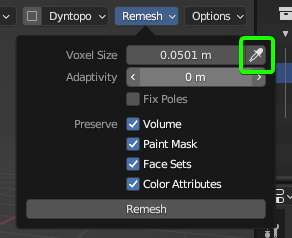
-
Sampling
: Directly invoke the size sampler/picker that can be accessed from the remesh option panel. Shortcut to invoke the tool should be consistent with other picker tools.
- Invoking the sampler should disable interactive adjustment status. Confirming or canceling sampling should return to the usual sculpt status. In other words, invoking sampler is practically switching tools.
1 Comment
This would be a nice addition yes. For the Dyntopo resize operator on
Rit's already possible to holdCtrlto sample in the viewport. Would be great to make these two operators more consistent.