
Select Shortest Path by Feature, e.g. Non-Manifold
Add option to
pick/select shortest path
operation to restrict path to edges of a particular type, such as non-manifold (outside edge), seam, crease, sharp etc.
Currently, picking the shortest path between two edges like pictured may produce results such as these:
when what you probably wanted was this:
The redo panel would have extra options like this:
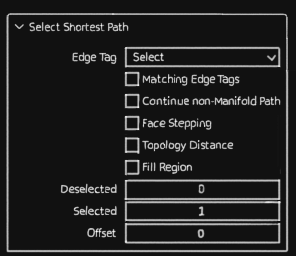
"Matching" is in reference to the active edge.
"Matching Edge Tags" will only travel edges with the same seam/crease/sharp/etc. tags as the active edge.
"Continue Non-Manifold Path" will only travel non-manifold edges if the active edge is itself non-manifold, else all edges can be traveled as normal.
Options could be expanded to allow preferring these types of paths first, then falling back to allowing any edges if they can't be found.
0 Comments