
Insert Keyframe Properties For Multiple Objects
Selecting multiple objects, each with their own action and inserting the position works as intended.
You can for example make a glide animation for the cubes by simply selecting all of them and inserting keyframes at different frames.
When you have a single object that has a rigidbody component, you are able to modify it's "Animated" property by inserting keyframes and modifying it's active status. You can as such create inertia for the rigidbody as shown here:
However, as stated in the first pharagraph, as you are able to select multiple objects and insert position keyframes for all the selected objects, you cannot do the same for multiple objects with properties like the "Animated" rigidbody property
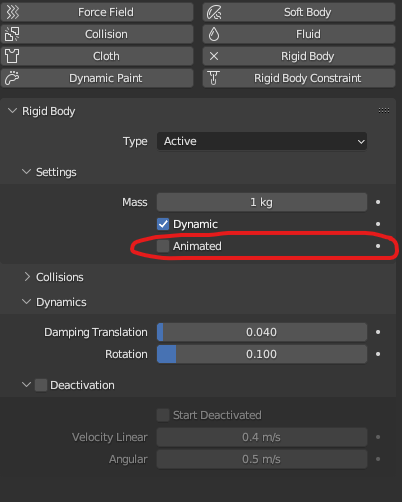
Example: Creating inertia for multiple objects selected becomes a difficult task
Selecting multiple objects and inserting position works for multiple objects. However, selecting multiple objects and inserting the rigidbody only inserts it for one object, not all.
Proposal: Insert keyframe properties for all of the selected objects
Advantage: This request becomes useful when baking animations in blender and exporting these in a game engine. Comes very useful in cases like cell fragment allowing more control over the rigidbody simulations.
0 Comments