
Ability to choose catalogues in pose library
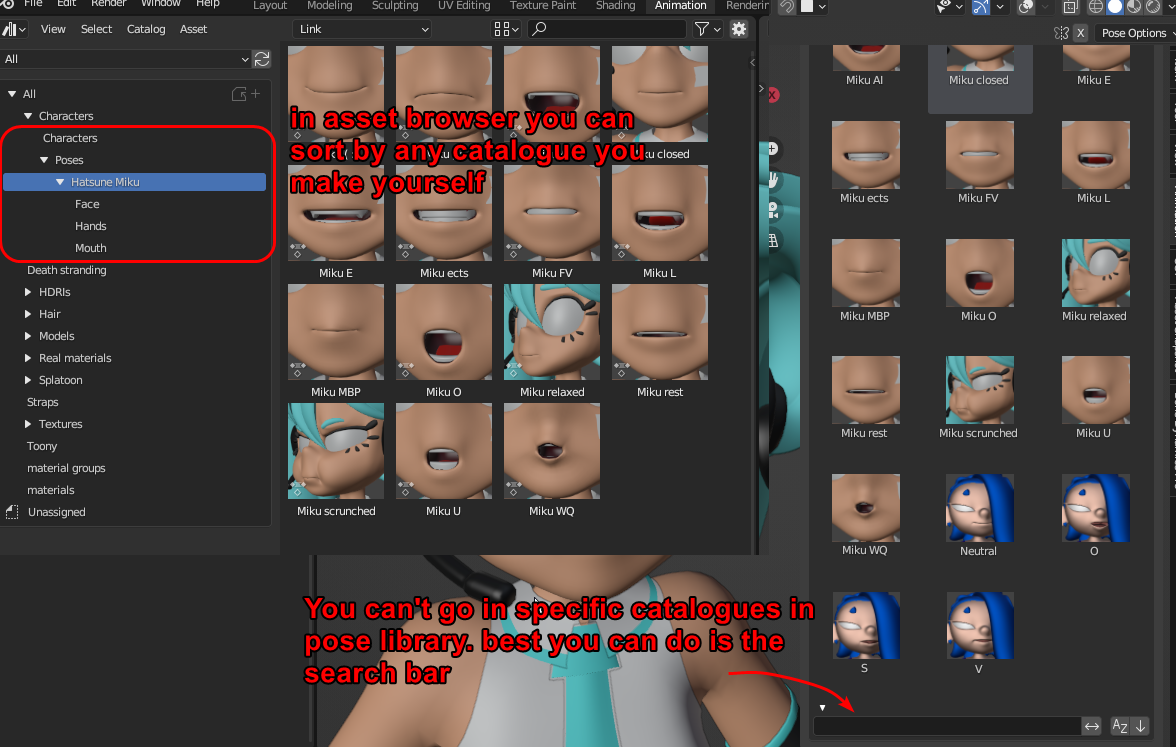 When you make poses you'd probably organize them in different catalogues, like eyes / mouth / hands / ect
though in the pose library (which is what is most effecient when animaing)
You have no other ways to filter between poses than the search bar. If you have several character poses, and different types of poses. You have no way of neatly finding the right ones. unless you make up a very specific naming scheme for every single pose like
Character-name_Mouth_Smile3
And there is also no way to batch rename specific poses, so changing a lot of poses later is a super daunting task
That's both a nuisance to maintain And, it makes it harder to find the right pose at a glance by reading the titles.
Solution:
Add a catalogue selection option to the pose library. Maybe restrict it to only categories that actually contain poses. So you can't open any empty ones.
2 Comments
Pose Library seems to get replaced with Asset Shelf, which allows you to choose a catalog using tabs. So this shouldn't be needed then.
it' s been the plan for the last versions yes, pose library' s features have been copied/moved to asset browser little by little