← All ideas
8 Feb 2019
Fudushae
Open
Modeling
Fudushae
Alex
AnubisMaster
BabaJan
CoB
Draise
Frozen_Death_Knight
IIIFGIII
KnockKnock
Lillya
MetinSeven
Remake
Shimoon
Tiggis
WesleySales3d
bestelix
bharatsahlot18
bnzs
briecmuldoon
dcb.creative
ferranmartinezclar
filibis
jfmjuls
jfranmatheu
jfraserm
kotulsky
kristian.emil
lordvigore
mike.r.bermudez
mokalay01
owei
radi0n
romanvolgushev4565
silex
spacedongle
sulyok.zs
theobairon16
thephobos
thomas.meurisse
xmaiter01
Reduce the tedious

6 Comments
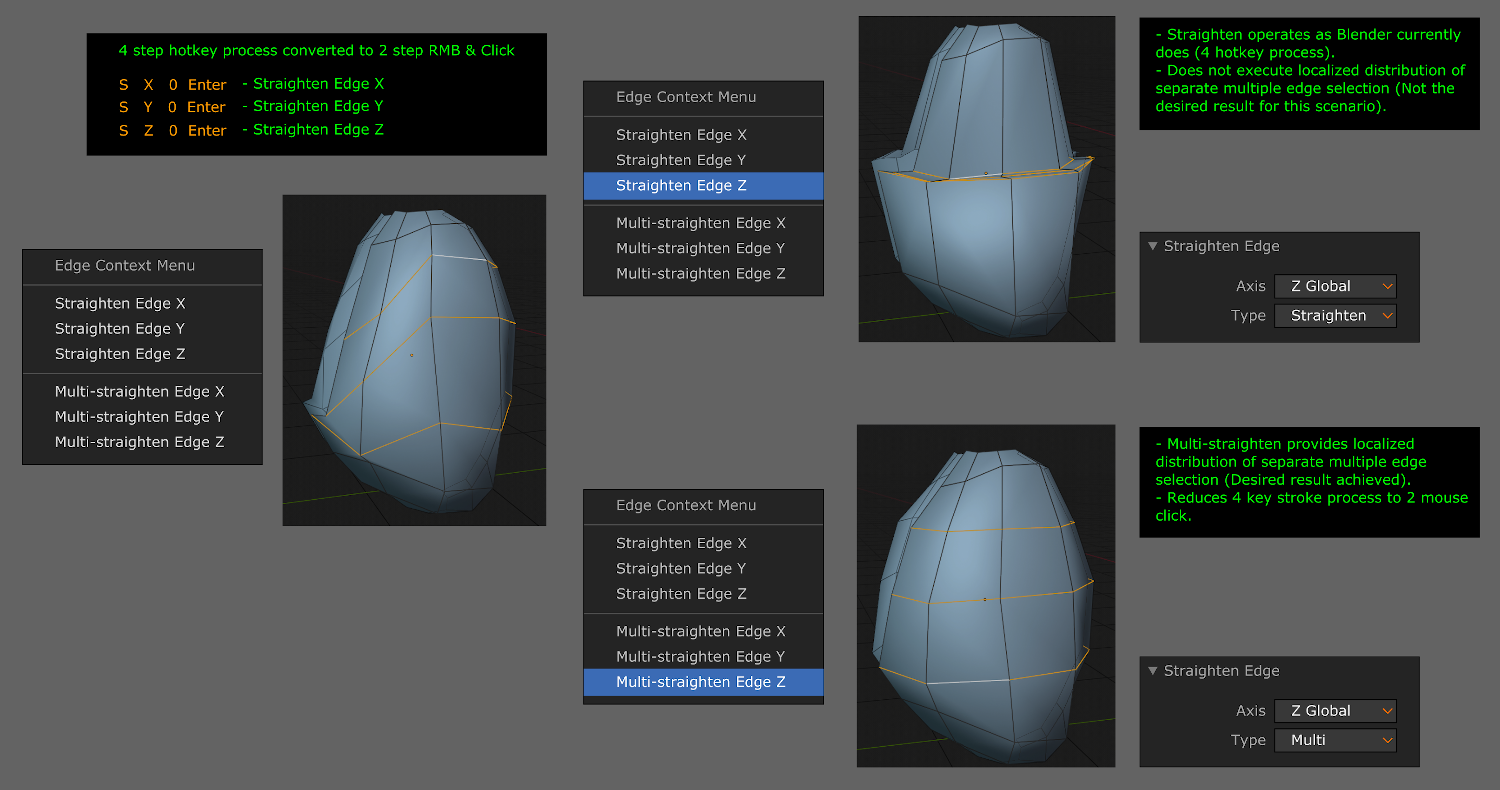
This could be sensitive to subobject context to flatten faces or vertex selections. For economy the second set (multi) could replaced with a modifier like Alt.
* @Ge Ro * I don't think it is good idea to hide functions in buttons behind modifier keys because they are impossible to learn and the user needs to have them memorized for every button.
* @o7216059 *It's just a suggestion for consistency as most buttons in blender show the shortcuts and alternatives in popups or in status bar. This way I learned them.
Does it still conform to the pivot point? Like will it straighten to: median point, active element, 3D cursor etc, whatever you have it set on. If so, I'm not sure how the multi straighten edge thing would work with active element. Would it default to an individual origin for each edge loop?
* @daniellapalme *' straighten' is to perform as median point & 'multi' acts as individual origin without the need to change or effect your current viewport pivot point settings.
* @fudushae * This would be great because having to adjust the pivot point all the time for individual operations is a bit slow. Some tools would hugely benefit from these pivot/multi options so you don't need to switch the pivot point all the time. The merge tool, the straighten edge (also in uv editor) plus a lot of other tools.