
Local Edit Mode
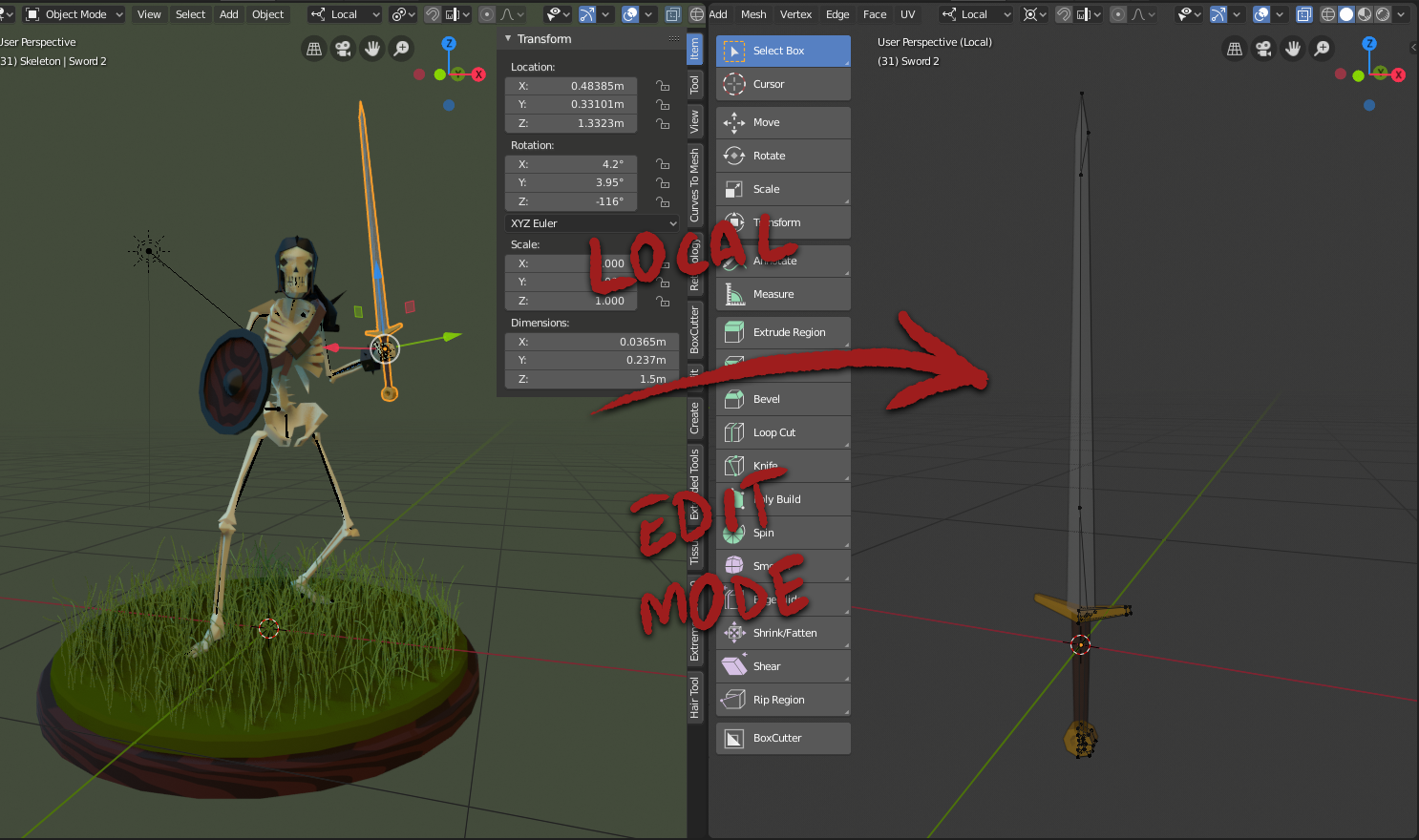
In order to improve the workflow of asset creation, it would be ideal to edit the objects locally, moving them to a space such as Local View, but eliminating the transformations of the main scene (rotation, scale and position).
Currently, when entering edit mode, the object remains in the transformation in which it is with respect to the main scene. This comes in very handy as example, for geometry that composes the environment, or to adapt the proportions and shapes of objects to their adjacent elements.
But when it comes to editing independent objects, and being able to make reusable assets, this is a drawback since, for example:
- It is difficult to understand how the object was initially conceived
- It becomes difficult to use modifiers such as Mirror or Array
- Numpad cameras (Front, Top, etc) lose their functional value
This wil also be ideal to edit Linked Duplicates.
74 Comments
Try the addon gumroad.com/l/qinstance
* @Roman * This is actually a pretty interesting approach, thanks for the heads up! I do not like it creating an Scene for each Object group tho...
Modo does something like this, I do think its a pretty neat way of working.
So basically the go to solution would by to automatically switch to Local view mode for selected objects when changing to the Modeling tab or Sculpting tab for that matter.
This could be a toggle in the Editing tab in user preferences for users who want that behavior, I personally just use a hotkey to go into local view and Frame the selected meshes whenever I enter edit mode.
{attachment Desktop_Screenshot_20190912_-_23322181png}
This is a good proposal to further improve the tabs functionality, give us the choice to edit the behavior of tab toggling.
* @akshayxw69 * That would be a great default behaviour. I don't wind up using the Modeling tab at all, since it's so easy to enter edit mode.
* @akshayxw69 * Unfortunately, current Local View keeps general scene transformation of the object. I guess ideally it will be a toggle in the top bar of the viewport, that switches to Local Edit, which will behave exactly like Local View, placing transforms to 0.
Exactly the same behavior I wish Collection Instance editing have. For now we have to keep master Collection in scene origin and there is now way to edit it content without hassle with other scene assets. And Duplicate Linked is not an option here because it's all about asset building we talk here (with separate and different type objects in it) or moreover it's about a Prefab concept with kinda auto-unpacking in separate view for those who is familiar with gamedev workflow (like do Unity/UE4 Prefabs or even Photoshop SmartObject editing). Sure we have an powerful option - "Link" to blend library but there is not the same from speed workflow side within single layout scene. So yeah that's would be awesome if this area have some automation.
* @yunisio * I see you get my point. Yes, what I'm proposing is exactly like how Prefabs work in Unity.
* @Alvaro Luque * Yes, glad we're in sync.
It make more sense to use instances. You let the original object or group at 0 and place the instancied object/group where you want in your scene, then you can edit your model(s) everytime you want with good transformations at the center of the world.
* @Shimoon * Yeah, i've been trying to use the All Instances way of thinking, you end up grouping all your Assets in one collection, all of them in 0,0,0 and unhiding, local view, edit, hiding all the time. It's also a bit inconvenient when you wont have more than one instance of that object in the scene.
* @Shimoon * Another workaround: instead of instances, use Duplicate Linked objects. So you still have the chance to edit your geometry at 0 rotation in the dedicated hidden Collection, but you can also make quick tweaks in the scene without changing layout
* @ Lsscpp * I think * @ Shimoon * was already meaning "Duplicated Linked" when he said "Instances"? Or maybe I understood wrong... :P
* @zgorg2004 * I dont really understand what you mean with the snaping. As a rule of thumb, objects tend to have its origin either in it's center of mass, or in a point where is convinient to handle position and rotation (as an example of my illustration, the origin of the mesh will be in the handle of the sword). I would consider the transform of an object as a value of the object in correlation to the world, but not as a property of the object itself. This is something that you can see easily in Game Engines like Unity, where assets can be instantiated in the Scene, but when it comes to edit it, everything around dissapears to focus the atention on the object itself. If the object is rotated, scaled, a placed far from the world origin, its quite dificult to do any meaningful modification without messing around. Im just suggesting a way where the object is temporarily placed in 0,0,0. Rotation is 0º,0º,0º, and Scale is 1,1,1, while you are in Edit Mode, Weight Paint, Texture Paint, Sculpt... you name it. This could behave as a toggle that appears on the top menu only when you enter edit mode. It would be nice if it triggers local view as well. I understand that this may not work when you have multiples object selected.
* @zgorg2004 * Definetly the first + second behaviour is the way to go!. Ultimately I dont know much about all the functionalities of your addon, but it would be great if the functionality is isolated and defined as a toggle button on the right side of the Object Mode dropdown, so it can be always active/inactive, or Local / Scene. {attachment Untitled-1png}
* @zgorg2004 * Do you really need to store the list of objects to be hidden/unhidden? Why dont you just enable Local View for the selected object while editing, so you dont need to handle other objects visibility? As soon as you get out of editing mode, you restore Global View
* @zgorg2004 * hahaha great! :) Any visible progress?
youtu.be/P5uNFOCG_fA
* @1conscience0dimension * what happened with all tour posts dude??
* @Alvaro Luque * it a request that we could delete former useless comments
* @Alvaro Luque *holy s... I did a fix and now it's keeping parent relation. youtu.be/cqEAgRd5XyM
* @1conscience0dimension * im traveling through Europe now, i Will try It out as soon as hit home
This would be great! When I set up my scenes I always see object that need tweaking, but it gets harder to tweak then when they're already rotated into place. Great idea for sure.
I would like it if it was a take on the already existing local view. With the local view being Num "/" hitting Shift+Num"/" could go to aligned local view. This would be really nice.
This was also be great for editing grease pencil objects. You often have a scene full of them, rotated, scaled, translocated. Having a one-key way to get into "edit mode" would improve the workflow significantly.
Do you mean, press ALT + D to duplicate the object (moved in object mode) then press ALT + G for reset the coordinates and then work on the own instance, am I right?
or similar to this Demo
* @Rosario Rosato * sorry my mistake i thought collection had transforms but they don't. they are only containers.
* @giuseppe * You can hit CTRL + A to make it real (from instances to real) afterwards you can use the modifiers.
Step 1. Create an object Step 2. Create an instance of the own collection and you can hide the main obj Step 3. Move this object in another scene (no copy, but drag and drop) Step 4. New Main Windows for controlling the object (no instance) Step 5. Working in Edit Mode, you can edit the object but the instances remain in the custom position.
It's a little bit strange approach but works.
I always wanted this feature in Blender. It comes from Modo and it's very powerful, better if the objects in the scene are visible tho, because in this way you can see what's around the object that you are changing. I used this to build many robots and hard surface objects.
Here is how it works:
youtube.com/watch
Perhaps someone can create a script that does this:
I think this script/macro should do the job.
Let me know if there is anyone who wants to make it.
Cheers, G
* @zgorg2004 * yes, that can be an idea. Also, I don’t think blender has a world system like the one in modo. I am not a python expert but if you use a collection that has the coordinates of the object and you temporary put the whole scene in that collection setting the coordinates to 0 and then do the inverse when you wasn’t to put the object+scene back in their original position... I think that should work.
By the way if you are interested in developing other addons I have a few interesting designs and ideas, you can always send me a message to giuseppe.bufalo@gmail.com 👍
* @giuseppe * Do you mean, press ALT + D to duplicate the object (moved in object mode) then press ALT + G for reset the coordinates and then work on the own instance, am I right?
or similar to this Demo
* @zgorg2004 * Dude this is amazing work. I've downloaded the add-on but the pie is nos working. It shows it default Mode Switch pie. I've tried to disabling the Official pie menu (which I've active) and its still not working
* @zgorg2004 * that's great. can you add an option to not isolate the mesh so all the objects are visible
* @zgorg2004 * Thank you! It worked like a charm! :) One question, what does SPE stand for? Are you going to upload this to a repo on github?
* @zgorg2004 * By the way, it does not work if the object has a "Child of constraint".
perhaps addon "group pro" would solve the pain of switching local and edit mode problem, and tedious scene management. But I personally would like group pro function build in blender native. ^^
Great idea that can greatly improve many workflows.
Wrong message, moved to reply