
Small change regarding gradients
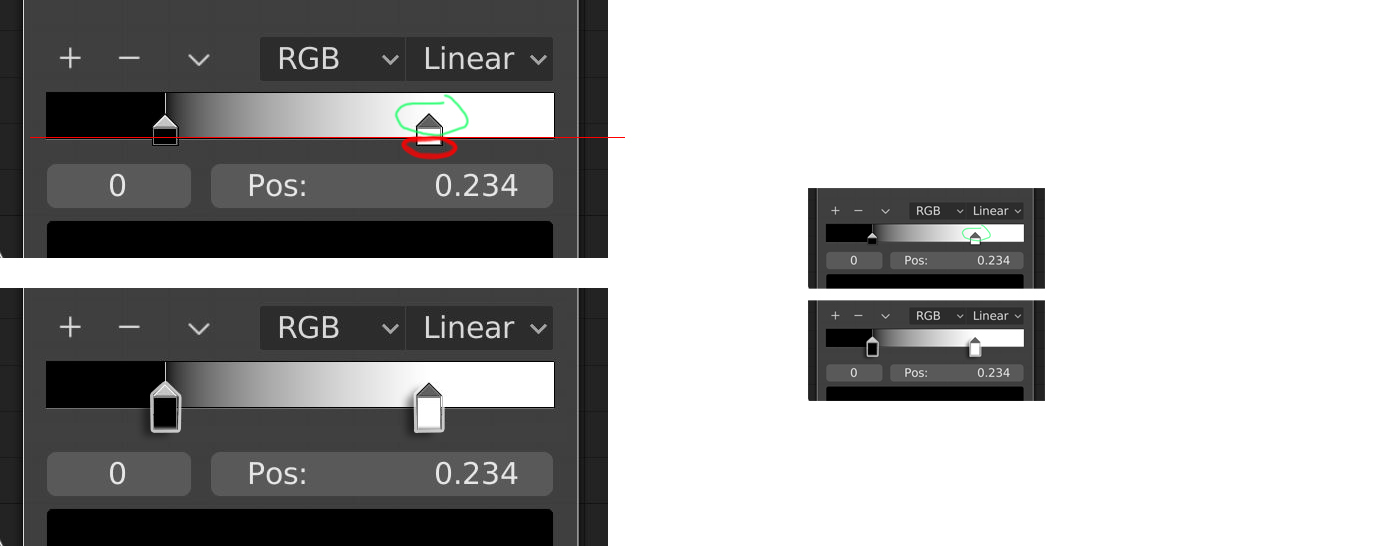
when selecting color marks even if zooming it is kind of difficult (at list for me) only the green marked zone is selectable while red is not,and they are small.
it will help making them bigger and making them all selectable including the area under the ramp
7 Comments
emm..., color marks are not clickable I think. what responding your click event is gradient bar on the back. So just click the gradient bar near the mark. it's little confusing now...
* @hadesx01 * i don't know if it's them or the gradient,but the point is keep things simple easy and clear to use.
I have struggled with this, glad this idea has been suggested.
is it a UI paper cut?
devtalk.blender.org/t/blender-ui-paper-cuts/2596/36
* @momotron2000 * in my opinion it is more then paper cut,but I don't know.
yeah, it'll be handy
actually that's a great idea. Those things can be hard to grab for sure.