
Proactive search bars
Global & proactive Search bar
Search bar which is automatically in "active" state, so you just need to start typing.
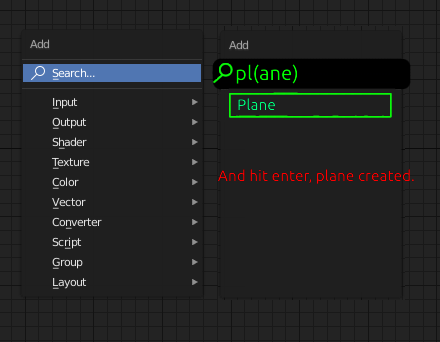
Add
- Pressing shift + A brings up "Add" menu
- You type: P L
- Plane will be populated below search bar
- Press enter and you have plane created
Preferences
- Pressing ctrl + K brings up the "Preferences" menu (not yet available)
- You type: KM + enter = Go to Keymap tab (not the best example)
- Then you can type more to go deeper to the menu
Shader nodes (currently you have to click search text to search, but there could be an option to select if the search bar is "activated after pressing shift + A.
This proactive would show in every place, file browser, etc. But if conflicts in usability then you can choose between the search modes (proactive, not active) in Preferences.

4 Comments
A lot of people want this very badly for nodes. It's nice to hit the tab key in other softwares and have a searchable list. Nuke does this well, since it also has the list menu if you don't know what to search for.
* @Josephbburg * Agreed. The search function is clumsy for nodes, you have to separately aim + click on the search bar (also the UI slightly jumps & changes which are a tiny glitch in UIX but still extra workload for (at least my) the brains every time you search something. Breaks the otherwise smooth user experience.
I like the idea of "Shift+A" going strait to search mode. The amount of time I just start typing to search and it doesn't work is... a lot.
I don't understand what you mean by "proactive" search though. What I'm thinking you mean is: A search mode that is not context sensitive.
If that is the case then how about just having 2 separate key bindings for the 2 search modes. "Context Search" and "Global Search"
The nearest feature that already exists is the "Spacebar" menu <i>(possibly "Shift+Spacebar" :: I changed my keybinding and I don't remember what default is)</i>. This "Spacebar" menu seems to be not context sensitive. Typing "plan" singles out "add plane" like in your suggestion.
Although this search method does not search <b>everything</b>. Maybe it should?
* @LilacDogoo * I meant with "Proactive" that the search bar should automatically be in active state whatever view you enter. Currently, the search field is passive in all views (except the spacebar search function).
Examples of the proactive search bar:
There's a huge difference between writing 2 letters and 4 letters, PL or PLAN, the latter takes almost the same effort as doing it "manually" in the menus.
When you start typing, the search bar could also be centered (or anchored where your mouse is currently) on the screen to make things even easier and to minimize mouse movement.
To make things even simpler, why not make the space bar search to be content / view specific?
Lightning-fast.
There might be some conflicts between key combinations in different views, but maybe these are minor issues compared to UX flow improvement.