
Display the Real Frame Number of Scene Strips in the VSE
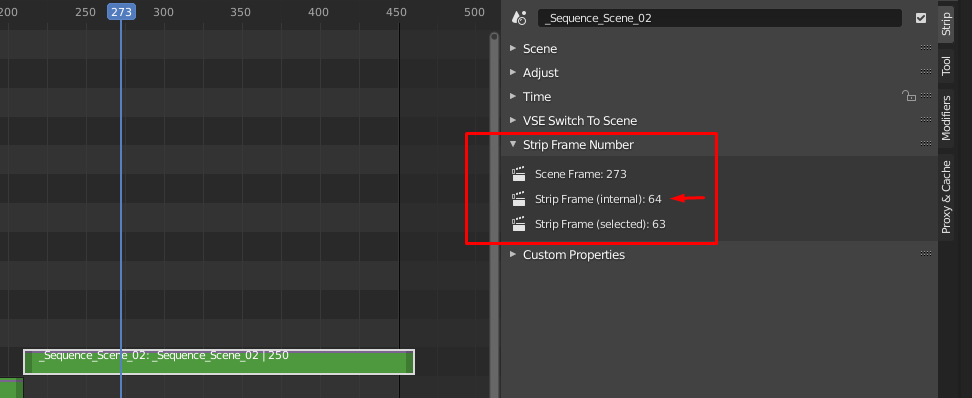
When working with scene strips in the VSE, Blender by default doesn't give any feedback as to which frame number of a scene strip is under the playhead. Instead, it mostly displays information about the strip in the context of the sequence , which isn't particularly useful.
Knowing the "real" frame number of a scene strip is vital should you want make changes to the internal scene at the specific frame beneath the playhead, or between a specific range of frames i.e. the frames between the in and out point of the strip.
For that reason I have coded a simple panel in Python that serves this precise function (see below). I'm not a full fledged developer really, so I'm hoping one of the Blender developers or someone in the community will take this code and add it to the next version of Blender or fork and turn it into a proper addon.
Code on GitHub
github.com/admorris86/Blender-Scripts/blob/main/VSE_show_strip_real_frame_number.py
10 Comments
That's a great idea to expose those values. If you want to make a proper add-on out of it, take a look at the Add Object Add-on template in the Text Editor. Maybe you want to appen it to the time panel: SEQUENCER_PT_time Could be cool it it would be possible to change the frameranges of scene-strip-linked to scenes from the edit-sequence, but I don't know if that's possible. You can find a lot of add-on code for the VSE here: blenderartists.org/t/video-sequence-editor-news-add-ons/1188770
Gents, I needed something like this so -- I hope you don't mind -- I added an addon wrapper around the panel,
github.com/gabrielmontagne/blender-addon-vse-scene-strip-frame-panel
Did a quick fork, which places those values and in smpte too in the Time panel: github.com/tin2tin/blender-addon-vse-scene-strip-frame-panel/blob/Time-Panel/README.adoc
github.com/tin2tin/blender-addon-vse-scene-strip-frame-panel/blob/Time-Panel/Scene_Strip_time.png
I love it! Using your version now.
Cool. I also did a post in the VSE chat with a link to a patch if that's something the BF devs wants. blender.chat/channel/vse
Cool. I think Blender's nested VSE scenes are a superpower.
Awesome! Glad to see someone getting some use out of this :D
I just ran the code and noticed you'll need a poll so these values will only be exposed when a scene strip is active: pasteall.org/qjUo
If you want to format the timings like in the Time panel, you can see how those values are exposed by doing this:
* @ tintwotin * Hey thanks for the poll recommend to hide the panel when other strip types are selected, I guess it would be useful to expand the code to work with image sequences also, but then again that might be tricky given the starting frame of an image sequence can be arbitrary and have any number of naming conventions.
I'd definitely like to turn this into a proper addon so I'll check those resources out thank you. I've been writing python scripts for a while now but this is the first time I've actually created a GUI for any of them, so there are a few new things I need to learn about.
I've added the code to a GitHub repo so feel free to add any commits :)
github.com/admorris86/Blender-Scripts/blob/main/VSE_show_strip_real_frame_number.py