
Utilize Space as Key Modifier And MMB Emulator
Hi! Greetings!
PREFACE
I've been searching how to do this for awhile: how to use Space button to navigate around scene like what Houdini does or what Krita does (Krita can pan the canvas with Space + LMB). I like to do this because i mainly work with tablet and stylus which has no MMB .
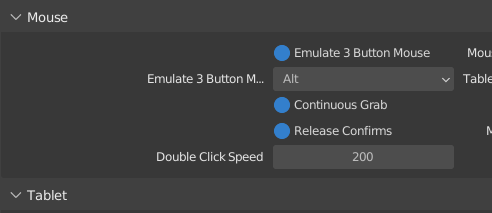
I've searched the internal and external solution. The best solution that i can came up with is to internally turn on the 'Emulate 3 Button' (Image 1) and externally swapping the Alt and Space button with some built-in linux function.
This allows me to navigate around my scene with Space. And since Space is now Alt, i can also use it as shortcut. For example:
Space + 1 = View Side, Space + 2 = View Front, Space + 3 = View Top, Space + 4 = Center View to Cursor, dbl-Space = View + Selected, etc you get the idea.
Its so easy to press and I'm so in love to use Space this way. When i want to navigate around scene, i can just let my left thumb down without seeing it. And the key combination is very easy to get too since the modifier is now a big button.
But... this the problem with this method is that it cannot be done without swapping the keys first and sometimes a little bit tricky if i constantly jump between Blender and another apps.
PROPOSAL
So the proposal is to create a dedicated function to treat Space button as MMB emulator and also Key Modifier, not key modifier like we already have but full modifier like Ctrl/Shift/Alt. (Current Key Modifier like in the second image cannot override modal or tool shortcuts)
THE BENEFITS
-
There will always be a new feature in blender in every new version. This feature can be seen as future-proofing to Blender shortcut system which Blender known to be better than other software.
-
Improved experience for tablet user, or blender user that mainly works with GP, Sculpting, Painting, etc, and even modeling (it does benefits me on my modeling process! :))
-
This replaces current Space that is just does one thing that Blender natively offer (Such as Play Animation, Tool, or Search) with many shortcut ahead.
THE DRAWBACKS
-
Users has to bind that one function to another key. Since not all users use play button that often, this will be easy
-
But for those who rely on playing the animation back and forth, they should reset their muscle memory. This is why i think this feature has to be toggle-able and let the users decide.
AT THE END , this is my proposal that i put together as best as i can. Thanks for reading this long. I do hope one fine day, this feature will be come to Blender or maybe an add-on exist.
Regards,
Friendly User Blenderman :)

2 Comments
I myself face with a shortage of keys on the keyboard, I use third-party software (SharpKeys) change the Left Win Button to F20, so the start menu will not open and you can bind anything to it. But I think I know how to write an addon that would allow to use the space bar for playback or search, as well as be able to combine some keys with it. This can be done through a modal operator. For example, when you click on the space bar, everything works as usual, but when you press or double-click on the space bar, it will be possible to call other operators. Can you write down any other wishes, and ideas. When I have time, I will definitely do it, because I need it myself.
Hi v.imran2018! Thanks for replying!
Honestly, I've dealing with this thing almost a year by now. I always had an idea to practice scripting to extend my skill. And finally in July this year i did start practicing scripting with a goal in my mind: to make Blender more friendly for me. So i started to make a script, and making some basic script that give a preset color to all the selected nodes, tweaking some UI stuff, etc... and eventually started to play with modal operator.
blenderartists.org/t/stop-modal-operator-whenever-initial-button-is-released/1411705
Here is my question i posted in Blenderartist.com about modal operator and also how to rotate/orbit the viewport with a non-modifier button (for once i want to get the C button to do rotate, Space for pan, X for roll and Z for zoom the viewport). And It worked actually. I was able to do what i want to do.
But there is the problem i posted. And also, if i want to combine all my desired shortcut in that modal operator, the operator will grow bigger than necessary. Don't forget to mention that this have to be done in the script level and not in UI. So when you suggest to do this with modal operator, i don't it that will be the most efficient way to achieve what I needed/posted.
But I have to be honest to myself: I'm still short in the field of scripting. So if you think you can do the script, then you might go ahead, But... with all of my respect i suggest you to read that first and perhaps answer that question whether in this proposal, or in that thread :))