
Pose Library UI : move the minus button
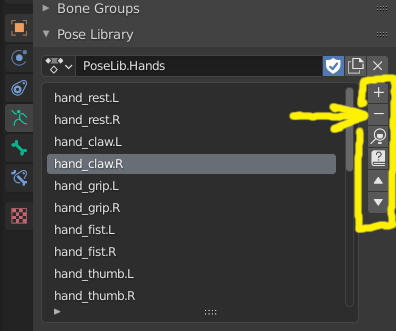
In the Pose Libary UI: Please move the minus button!
When creating (+ » Add_New), modifying (+ » Replace_Existing...), and applying (magnifying-glass icon) -- my mouse cursor is constantly crossing over / near the delete-pose (Minus) button.
Yes, if I actually hit the minus-button (and notice) I can immediately ctrl-Z undo... and yet, there I am dancing around it for hours. :(
Suggestions:
- either move the Apply-button to the top (so that order is <apply, new, ((gap)) delete, ...>,
- better yet, move delete all the way to the bottom of these 6 buttons, and perhaps change to the 'X' icon.
I apologize for griping about a really minor tweak, but spending 8 hours dancing over a "Self-Destruct" button is a constant low-grade stressor that I just had to mention.
Thank you for blender!!
6 Comments
If you use the Pose Library a lot, I would recommend taking a look at this as well: blendermarket.com/products/pose-library-thumbnails
* @etufo2 * Yes, I would love that functionality, but I wish it was built into blender. I understand addon makers need income too... but my current finances preclude my taking advantage of all the non-free addons that are out there.
about the Pose Library, shouldn't it be logical to have the bones (that are concerned by the selected pose) automatically selected?
* @moonboots * I appreciate how they set this up: if you have no bones selected, then the whole pose is applied; but if you have only "some" bones selected, then they perform a set-intersection and apply the pose only to the selected bones. This allows you to use partial poses.
* @seanan * ok I guess it has changed since the last time I've used Pose Library, my comment is not accurate anymore
Also pose library would need better organizer - is there something similar to pose library as shape key + github.com/MichaelGlenMontague/shape_keys_plus ? i have no idea.