
Compact Timeline
There are some cases user needs to open 3 timelines in the same time. For example while making animatic, there needs to be 1 grease pencil time line for strokes, 1 dope sheet timeline for camera and 1 sequencer timeline for editing sounds. And all these timelines have common areas that some users never needs. For example if your layers are fixed, there is no need for search bar. If you could use middle scrooll on your mouse or shortcuts, you never need to use scroll bars for navigation (which are located in the bottom and the right sides of the timelines. Also these sidebars have the same area if you are using one layer and could be accidentally activated easily especially with stylus pen.
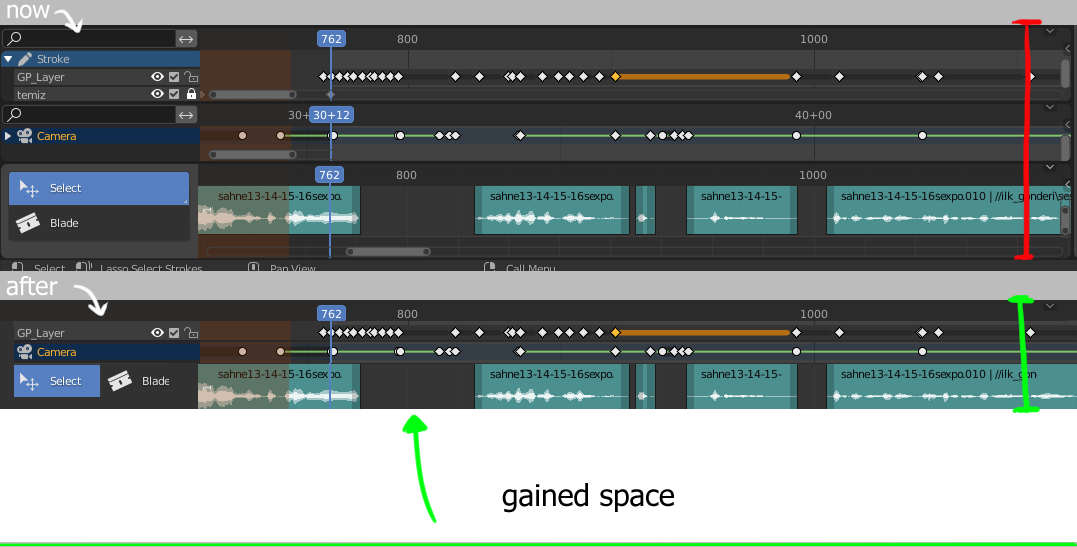
So here the idea that I want to submit is to have an option to hide these areas like the option Blender offers for headers and side bars. Result could be something like in the picture below.
2 Comments
Issue of your case is deeper than just compact timeline. On your mockup you sticked together three different editors as if it single editor something.
How you imagine it has to work? When you place them on top of each other? If yes - what should happen if one of them wider than others? Or you want some new "transformer" animation editor where user can customize set of different layers under single timeline?
In this case I just hide headers and just removed the areas that I never need while animating (search bar areas and slide bars) So it seems like a single editor and in this case it doesnt' effect me if it's a single editor or not.. Probably single editor would be better and I saw many animators complaining for not having this option but seems like there are some technical and deeper issues occurs on that level.
This is actually working by assigning some shortcuts to tools for switching modes and I am very comfortable except the issues I mentioned. I just hidden the headers, I use Blender like this all the time. These timelines also in sych thanks to "Sync Visible Range" option. Having them on top of each other gives me option to manipulate the keys simultanously and its very essentional while making animatics. Many editing and hand drawn animation programs also works this way such as Toon Boom.
I don't want to use transformers while I have the actual keys and there again will be the slide bars which are accidentally activated by stylus pen.
Beside that these transformer animation editors also could have an option to be viewed like sequencer clips but this is another topic. For who interested I suggest them to examine the TVPaint (free demo available on their site) which has a very handy timeline design (two squares on o larger clip that enables sliding rest of the sequence) that could be extremely useful for 3D animators as well..
In summary here I just want to picture how much space will be gained just by hiding option for slide bars, time scroll areas (1 area on top of all is enough) and search bars which are also repetitive in these cases.