
automatic simulation baking progress update
I have been playing with blender's fluid simulations for a few days now and because my device is not so powerful, blender crushes pretty often during baking.
crushing this is totally reasonable, but the fact that blender requires you to re-bake from where you last saved(the progress) while all the data[1]* is already there in my files is kinda frustrating for me.
here's a example, I have a 100 frames fluid simulation and I've already baked and saved 20 frames yesterday day. today I started to bake the rest and crushed at frame 85. when I reopen blender and press "resume" it jump to frame 20 instead of 85.
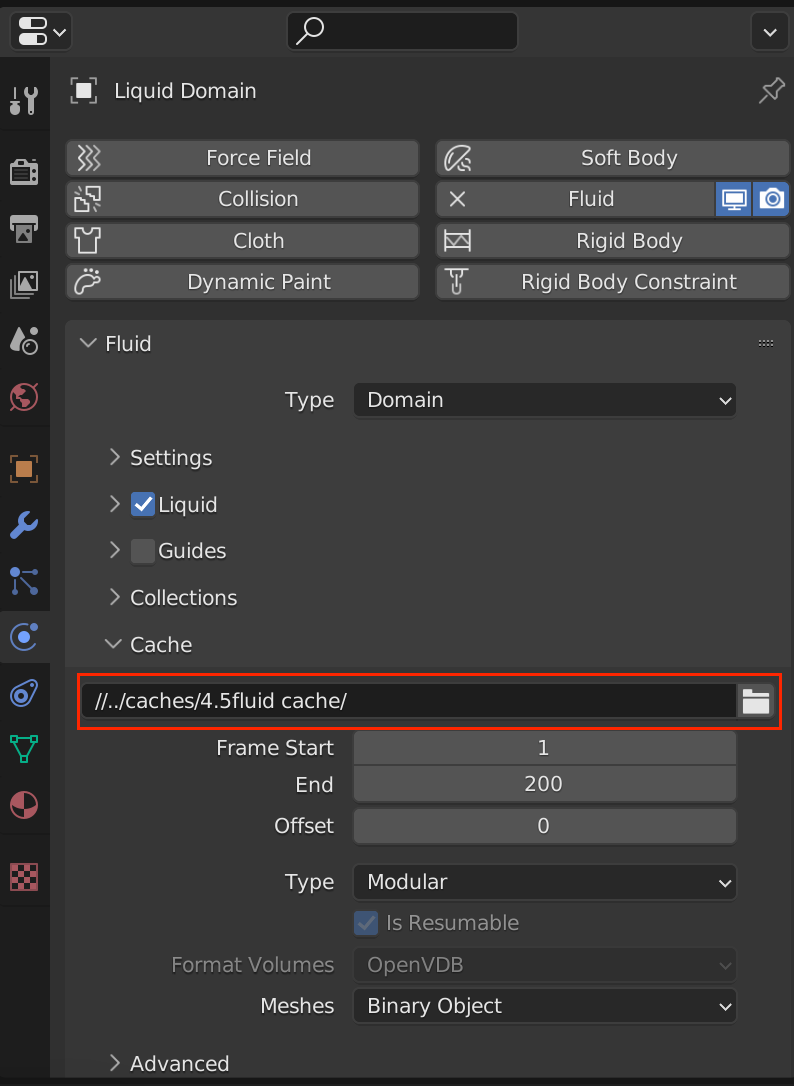
by all means I am no expert to how cache these things works, but if possible, it would be nice to add feature that can read the cache folder[2]* and automatically update the baking progress so we don't need to re-bake the exact same thing all over again while its already there.
if the above is possible, I think it should also allow the users to import cache data which might be helpful?
let me know if I've got something wrong like there's more crucial data saved with the .blender file or something like that, thx.
[1]* just to make sure I'm not using the wrong terms, by data I'm referring to all the cache data saved to a user defined location. the cache(for fluids) include config(.uni), data(.vdb), and guiding(I'm not suing guid so I don't know what kind of file is this). see figure 1.
[2]* by cache folder I' referring to the cache directory in Physics property -> fluid(type: domain) -> cache. see figure 2.
figure 1.

figure 2.
0 Comments