
Double click to send 3d cursor to the origin of the grid
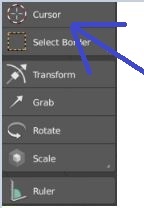
I noticed that you can not send the 3d cursor to the origin of the grid with just two clicks to its icon and I think that this is something very useful and necessary that should be implemented. Another alternative could be that this icon deployment a menu like the selection and scaling buttons below.
6 Comments
Or just add a button in the Topbar.
I like this idea, and to have visibility this option you could add the information that with double click you center it in the status bar.
@fabiocroldan: Thank you, I hope that the development team take a look because it is an option that I think would be useful for many
blenderartists.org/t/2-8-default-keymap/1116935/178
I like the idea of sending the 3d cursor to the center of the grid with the buttons on the screen without having to use the keyboard, I hope you add this possibility.
I would rather that clicking on that show a drop down of the tools (Cursor, Select Border, Transform...). Maybe a right click on that can show some relevant options for the selected tool. In the case of the cursor, center to origin, grid etc...