
Access color palette anywhere
Yes, Blender has a color palette, it is accessible in the Tool menu, in Texture Paint mode.
Manual page
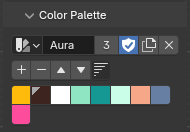 If you need to drop some colors in the shading workspace or anywhere else, you select an object and go into texture paint mode, which takes some time.
It would be nice to have the color palette pinned to a menu that isn't specific to the texture paint mode, or to have a shortcut for it.
If you need to drop some colors in the shading workspace or anywhere else, you select an object and go into texture paint mode, which takes some time.
It would be nice to have the color palette pinned to a menu that isn't specific to the texture paint mode, or to have a shortcut for it.
2 Comments
Thinking there should be other editors that probably already have color pickers and palettes that would do the job, I thought surely the image editor would be it! As it's not rare to have this editor open while shading so to preview or paint image textures or even sample colors from images (sometimes being palettes, hah). But to my surprise: color picking is only possible in paint mode or from outside the Image editor. As for palettes, I couldn't find them anywhere, not even in paint mode!
I know we don't need to have everything accessible from everywhere, but perhaps places like these could need some thought.
On a different style, someone proposed to have palettes and swatches history in the picker popover directly: Colorpicker with palette — Right-Click Select
+1