
Better outline rendering for viewing polygons from the side
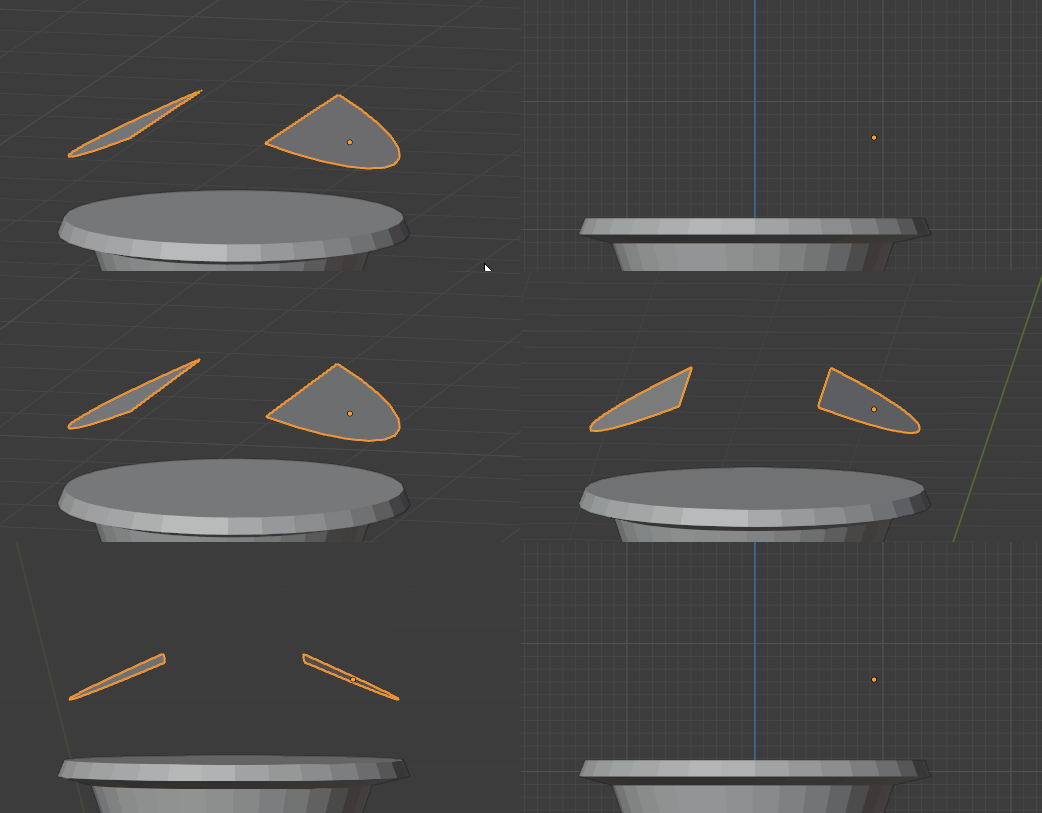
In Object Mode and in Orthographic Perspective it is often difficult to work with geometry that is flat, such as a simple plane. There is a bright outline around the geometry when viewed at an angle but this completely disappears as soon as the view is turned to point parallel to the polygon.
Is anyone else ever annoyed by this and how do you deal with it? Is this a shortcoming of rendering inside blender? I believe other programs have a better way of displaying flat polys from the side.

4 Comments
I turn a wireframe mode, sometimes together with xray transparency..Excessive actions But this is the path of the blender))) ... Another topic that terribly annoying me is that to understand where the reverse side of the polygon has to include a "tick" - "face orientation".viewport is displayed quite terrible, compared to 3ds max in which it does not need no checking, perfectly visible the opposite sides of the polygons.
See also this developer.blender.org/T79204 , developer.blender.org/T78482 and this devtalk.blender.org/t/blender-2-8-wireframes-discussion/666
Just enable "Wireframe" option.
What's really annoying - disappearing of cuted by Clipping Region (
Alt+B) polygons. Would be nice if clipping draw edges on polygons clipping borders.Indeed, usually i just aply a solidify modifer to see it better, but thats far from an ideal solution